



1 - What is CI CD
- CodeCommit : source control service
- CodeBuild : compiling source codes, runs test and produces packages ready to deploy
- CodeDeploy : Automates code deployment to any instance (as EC2)
- CodePipeline = CodeCommit + CodeBuild + CodeDeploy
to remember
- Continuous Integration = CodeCommit
- Continuous Delivery = CodeBuild + CodeDeploy
- Continuous Deployment : CodePipeline
2 - CodeCommit 101
to remember
- Centralized Code Repository
- Enables Collaboration
- Version Control
3 - CodeCommit Lab
ToDo
- Developer Tools
- CodeCommit
- Create a repository
- Create branch
- Create a commit
- Create a pull request
If the branch is out update, we have to clone the master branch before to push on it
4 - CodeDeploy 101
Automated Deployment works with :
- EC2 instances
- on-premises
- lambda
Instance runs on Elastic Run Balancment
2 deployment approaches :
- In-Place : the application is stopped on each instance = Rolling Instance :
- 1 elastic run balancment + 3 instances
- so the capacity will be reduced
- new version = Revision (= virgin)
- you can NOT rollback quickly
- first deploying
- fees : +
- Blue (active deployment) / Green (the new release) :
- 1 elastic run balancment + 2 group of 3 instances
- switch between group of instance
- no reduces of capacity
- you can rollback quickly
- after first deployment
- fees : ++
- safest option
5 - Advanced codedeploy the AppSpec File
AppSpec File : configuration files defining the parameters used during a CodeDeploy deployment
Le fichier Appspec est un fichier spécifique à CodeDeploy. Ce fichier permet d'orchestrer les actions à mener sur une machine. Il est sous format YAML ou JSON et se place à la racine du repository GitHub de notre WordPress.
Ce fichier est nécessaire pour :
- mapper les fichiers applicatifs avec leur destination sur l'instance
- gérer les droits des fichiers applicatifs
- spécifier des scripts à exécuter durant le cycle de vie du déploiement.
File structure
- version (allowed value is 0.0)
- OS
- files : location
- hooks : life cylce event hooks (have a specific run order)
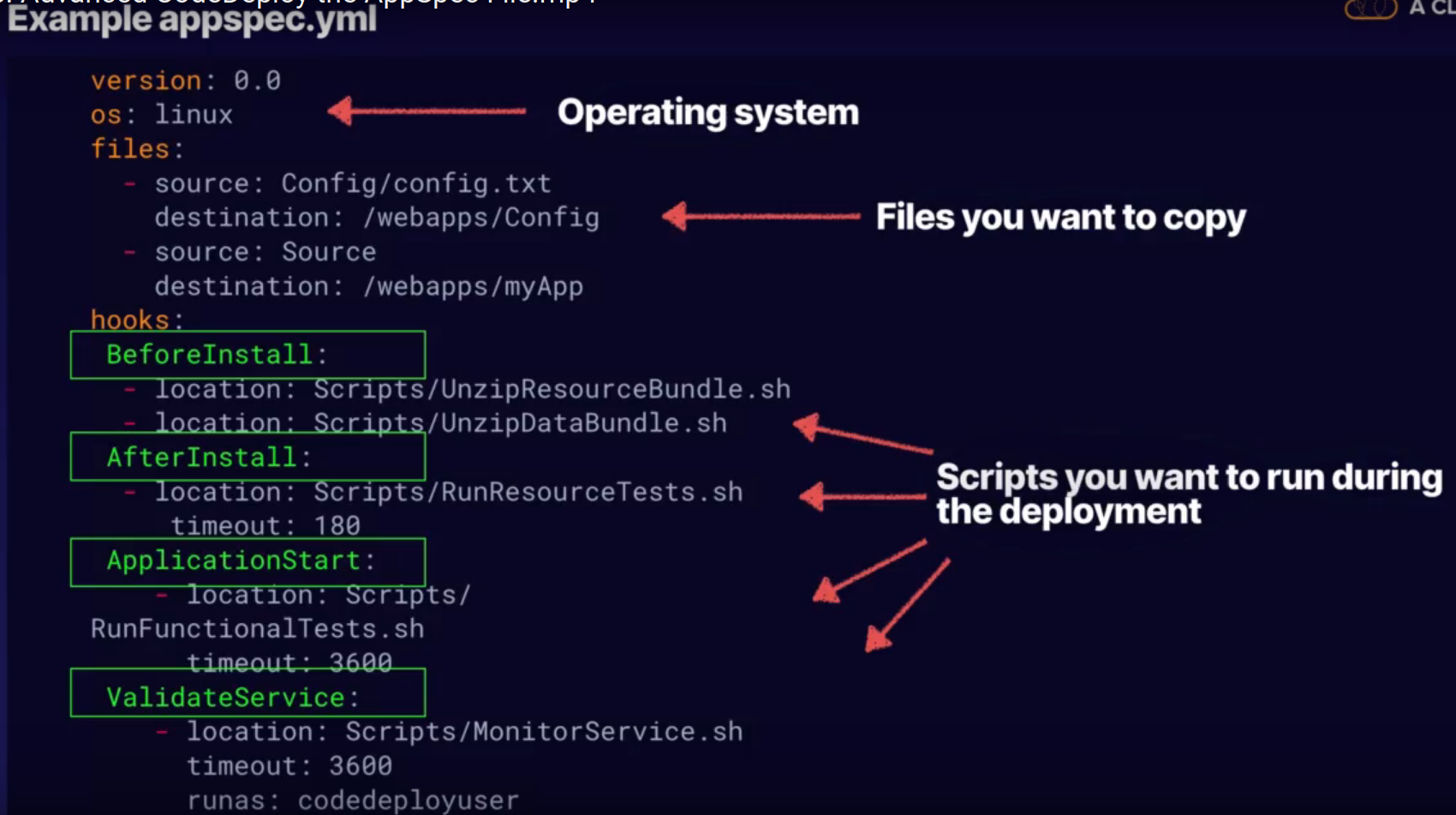
step
root folder contains :
- scripts (launch in the appspec.yml indicates in the hook : (installdependencies.sh or startserver.sh or stop_server.sh) )
- Config
- Source (index.html)
- appspec.yml (root position of the yml file)
6 - CodeDeploy Lifecylce Event Hooks
Run Order - Phase
- De-registering instances from a load balancer
- Before Block Traffic
- Block Traffic
- After Block Traffic
- Installation : The real nuts & bolts of the appllication deployment
- application stop
- Download Bundle : CodeDeploy agent copies the application revision files to a temporary location
- BeforeInstall : Pre install script (as backing up the current version or decrypting files)
- Install : Copy application revision files to* final* location
- AfterInstall : Post install scripts e.g. configuration
- ApplicationStart
- ValidateService (test)
- Re-registrering with the load balancer
- Before Allow Traffic
- Allow Traffic
- After Allow Traffic
CodeDeploy sont les suivantes:
- On crée une application CodeDeploy
- On cible les instances sur lesquelles on va déployer : le groupe de déploiement
- On spécifie la configuration du déploiement
- On envoie une révision du code à CodeDeploy
- CodeDeploy la déploie
- On vérifie le résultat
- Si besoin on redéploie
7 - CodeDeploy Lab
ToDo
- Security, Identity & Compliance
- IAM
- Create a role from S3Full access policy
- Create a role from AWSCodeDeployRole : Allow it to call AWS services, allowing :
- AutoScaling
- Describe instances and terminates instances
- cloudwatch
- tags
- registering and deristering with our load balancer
- Services - Compute - EC2 IAM Linux
- noneed to define a subnet
- auto assign public ip
- add tags to help codeploy to use this tags to identify the instance to deploy
- configure security group : SSH & HTTP
- choose a key pair
- Connect to ec2-user@
-
on the instance.
- wget htps://aws-codedeploy-eu-wet-2.s3.amazoaws.com/latest/install
- sudo service codedeploy agent status
- connect the local machine to code deploy from the local machine
-
on aws console :
- add user and save its access key ID and value (programmatic access)
-
on the local machine :
- $ aws configure
- Upload in a bucket the config files (appspec.yml : application bundle) to give the possibility to CodeDeploy to Access them
- AWS console - S3 - Storage - bucket
2.$ aws deploy create-application --application-nam mywebapp
- Developper Tools
- CodeDeploy
- Application - mywebapp
- deployment group - create : 1. envirobment configuration : Amazon EC2 instances 2. setting : AllAtOnce, halfAtOnce 3. Use or not the loadbalancer
- Application lifecycle event failure
- Rollback configuration
8 - CodePipeline
Roles
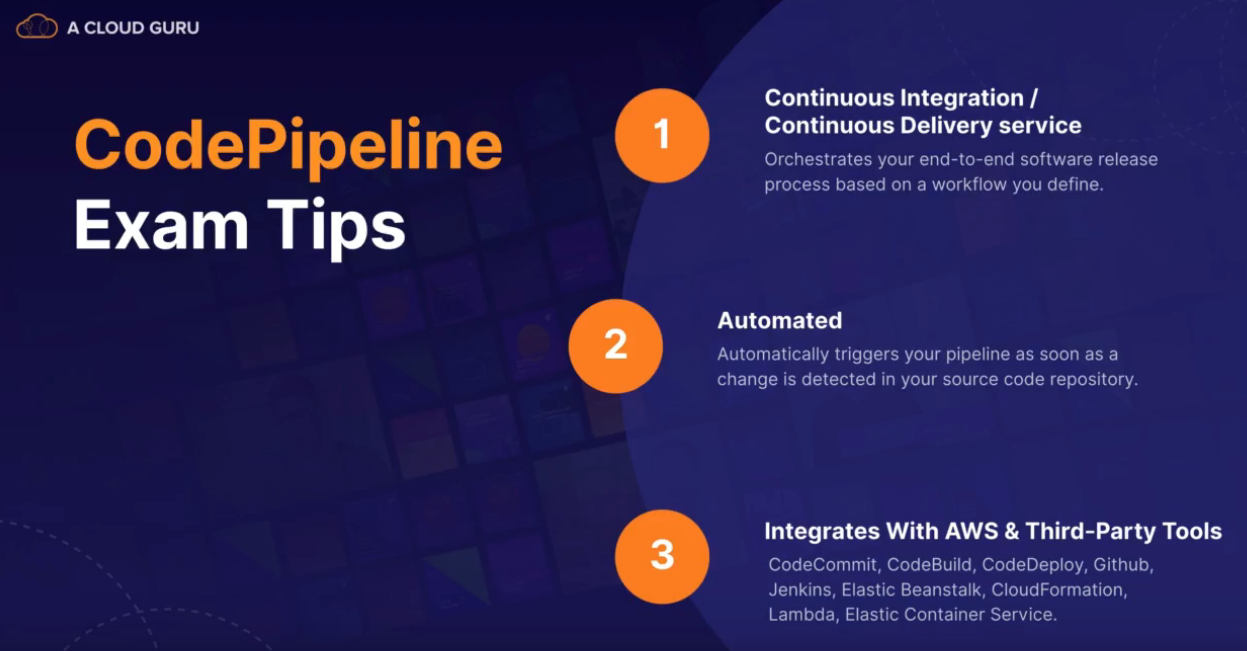
A fully managed CI/CD service :
- Triger a pipelin every time there is a change to our code
- Aitomated Release Process
- integrates with AWS tools :
- CodeCommit, CodeBluid, CodeDeploy, GitHub, Jenkins, Elastiks (containers managers)...
CodePipeline Workflow
- CodePipeline (workflow defined)
- CodeCommit (new code appears)
- CodeBuild (testes)
- CodeDeploy (application deployed)
to remember
9 - CodePipeline lab
steps
- Cloud formation to create an EC2 instance
- Upload a version 1 to S3 bucket
- Deploy EC2 instance using codeDeploy
- Code Pipeline : a managed trigger to deploy our version 2
- Cloud Watch : : a automaticaly trigger to deploy our version 3

Origin folder and files
CF.txt : CloudFormation commands : laucnh an EC2 instance as on the AWS console
CF.json : tag our instance to identify xith code deploys, asosicate an SSH key pair name, set up a security group, mapping in at least a region
steps
1sr deployment
- creation of the bucket using CloudFormation :
- upload the CF_template .json files to your own bucket
- run the CF.txt files
- before :
- indicates bucket name
- indicates key pair name
- create policy to grant new right to the user
- add the app.zip to the bucket
- verify that the cloud Formation wtack has completed using :
- $ awscloudformation describe-stacks --stack-name
- Log into you instance and check that the codeploy agent has correctly installed :
- laucnh EC2 instance and copy its IPV4 IP
- ssh i- keypair.pem ec2-user@
- sudo service codedeploy-agent status
- CodeDeploy
- Deploy Group new
- Find the instance thanks to its instance
step with Code Pipeline with manually upload :
- Choose pipeline settinfs
- Add source stage (where our application S3 object key : app.zip is locataed)
- Add build state (providing build artificat details like OS, output files names : CodeBuild or Jenkins)
- Add deploy stage (deploy provider, region, application name, deployment group)
step with Code Pipeline with triggered codeDeploy (automatic deployment)
- upload the app.zip
10 - IAM - Lab

.JSON :
{
  "Version :" : "2012-10-37",
  "Statement" [
    {
      "Effect" : "Allow",
      "Action" : "*",
      "Resource" : "*"
    }
  ]
}
to remember
- Roles are more secure thant storing your access key and secret access key on individual EC2 instances
- Roels are easier to manage
- Roelse can be assigner to an EC2 instance after it is created using both AWS console and command line
- Roles are universal (any region)
11- Using BootStrap Script - Lab
Way to automatisating AWS deployment
ToDo
1.S3 bucket using our bootstrap script
-
Add in Advanced details at the configure Instance details
#!/bin/bash
yum update -y
yum install httpd -y
service httpd start
chkconfig httpd on
cd /var/www/html
echo "Hello"
aws s3 mb s3
aws s3 cp index
12 - Instance MetaData
curl http://123.123.132/latest/meta-data \ > bootstrap.txt

curl http://123.123.132/latest/user-data \ > ip_adress.txt
EC2 vs Lambda
https://www.simform.com/aws-lambda-vs-ec2/
EC2 = Elastic
AppSpec file : YAML only
Amazon Elastic Compute Cloud (EC2) est un service d'infrastructure de cloud virtuel proposé par AWS. Il fournit des ressources informatiques à la demande grâce auxquelles vous pouvez créer de puissants serveurs dans le nuage.
L'ensemble du matériel de l'EC2 est fragmenté en de multiples ressources qui sont offertes sous la forme d'instances évolutives en termes de mémoire de calcul et de puissance de traitement.
Il vous offre également la possibilité d'héberger votre application sur plusieurs plateformes avec une sécurité renforcée pour une architecture multi-modèles et multi-locataires. Ces instances peuvent être accessibles par HTTP ou HTTPS (API), ce qui permet aux développeurs de créer des applications comme s'il s'agissait d'une infrastructure sur site.
Avec Amazon EC2, vous avez la possibilité d'approvisionner des machines virtuelles selon les besoins de vos applications. Cette possibilité est offerte dans le cadre d'un modèle d'abonnement basé sur l'utilité, où l'utilisateur est facturé en fonction de sa consommation de ressources.
AWS Lambda
AppSpec file : YAML and JSON
AWS Lambda est une ressource de cloud computing à la demande proposée en termes de fonction-as-a-service par AWS. Au fil du temps,
La principale différence entre AWS Lambda et EC2 (ressources basées sur des serveurs virtuels) réside dans la responsabilité du provisionnement et des cas d'utilisation, pour n'en citer que quelques-uns. La tarification d'AWS Lambda est également l'un des principaux facteurs.
Avant l'émergence de solutions agiles comme AWS Lambda, les équipes opérationnelles devaient allouer les ressources en fonction des prévisions. Elles devaient s'assurer que les besoins en ordinateurs et en mémoire ne dépassaient pas les limites que leur système pouvait supporter.
Avec des ressources informatiques comme AWS Lambda, les ressources informatiques peuvent s'adapter et diminuer automatiquement en fonction des demandes en temps réel. Actuellement, AWS Lambda prend en charge plusieurs langues et peut être utilisé dans une application de plusieurs manières ou en tant que service.
L'architecture des applications construites à l'aide de fonctions comme AWS Lambda est communément appelée architecture sans serveur.
Which one to use
If you’re wasting your compute resources due to unpredictable traffic for your application but still want a scalable and cost friendly solution, AWS Lambda is for you. When not to use AWS Lambda? When you want to do complex processing and your process can’t be executed in the limited execution time.Or maybe you want to run a complex application which has consistent traffic and want to operate in a tried and tested deployment environment, EC2 if for you. The only drawbacks are a complex setup environment and provisioning of servers.The result- For either AWS Lambda vs EC2 or vice versa, both operate for a highly specific use case, however, one wasn’t sufficing the need which necessitated the invention of another.Until then, let’s make the most of each of the services. If you’ve hands-on experience with either EC2 or Lambda or both, I’d love to hear from you.