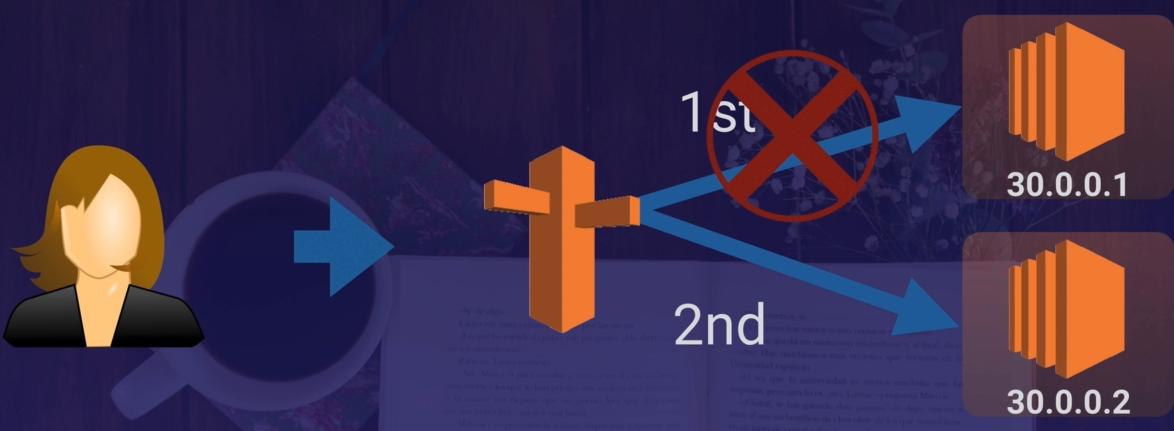



1. DNS 101
Route 66 + DNS on the port 53
IPV4 vs IPV6
- 32 bi -> 4 billionof different adresses
- 128 bit -> 340 undecilion addresses
Top level domains
- the last word in a domain is the top-level domain
- IANA : Internet Assigned Numbers Authority : root zone database containnng all available top level domains
Domain Registrars
- Registrars : authority that can assign omain names directly under one or more top level domains
- InternNIc : a service of ICANN, which enforces uniqueness of domain names accross the internet
- WhoIS database : each doamin name are registered in this central database
- GoDaddy.com, 123-reg :.co.uk : you can buy domain name
SOA
- Start of Authority Record
-
it records sotres information about :
- name of the server that suppied the data for the zone ,
- the adminstration one
- the current version of the data file
- the default number of seconds for the time-to-live of a fiel on resource records
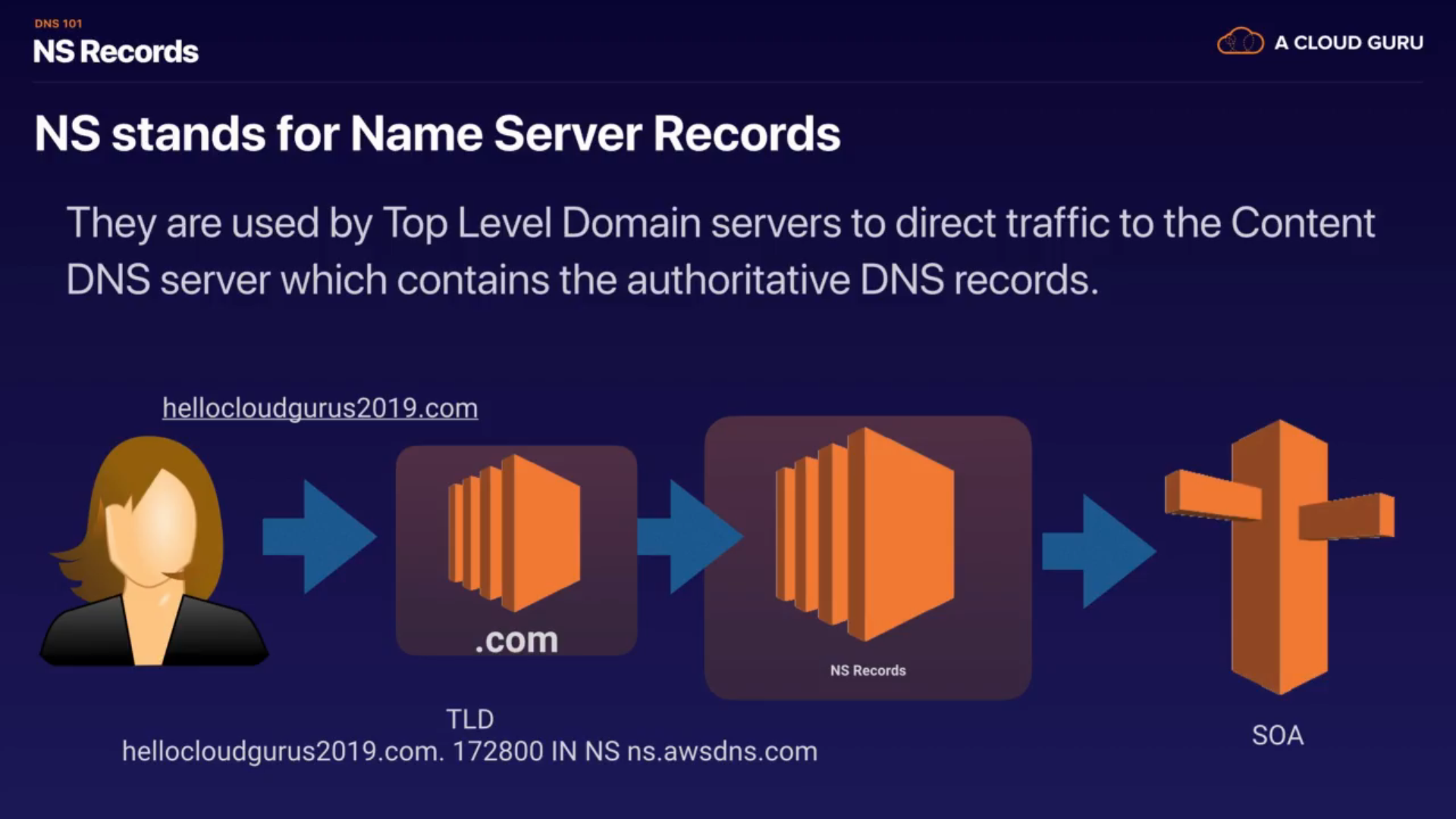
NS Records
- NS : Name Server
- they used by top level domain to direct traffic to the Content DNS server which contains the auhorittive DNS records
an A record
- fundamental type of DNS record
- A = Address
- used by a computer to translate the name of the domain to an IP address
TTL
- it is the length that a DNS record is cached on either the resolving server or the user own local PC
- Time To Live second
- the low the TTL is, the faster changes to DNS records take to propagate throughout the Internet
CName
- it is used to resolve one domain name to another
- A canonical Name
- used to have the same adress for mobile devices and pv device
Alias Record
- are used to map resource record in your hosted zone to Elastic Load Balancers, Cloud Front distributin or S3 bucket
-
same as CName, allow map one DNS name to an other 'target' dns name
- crucial difference : CNAME can not be used for naked domain names (zone apex record) ; you can not have a CNAME for http://acloud.guru, it must be either :
- an A record
- or an Alias
- a CNAME be used for
remember
- ELBS do not have a predefined IPV4 addresses, you resolve to them using a DNS name
- Understand the difference between an Aliaz Record and a CNAME
- GIbent the chouce, always chose an Alias REcord over a CNAME
-
Common DNS Types
- SOA
- NS
- A
- CNAMES
- MX
- PTR
2. Route53 - Register A Domain Name Lab
https://aws.amazon.com/fr/route53/ Un moyen fiable et économique de faire le routage des utilisateurs finaux vers des applications Internet
Amazon Route 53 est un service Web de système de noms de domaine (DNS) dans le cloud hautement disponible et évolutif. Il est conçu pour offrir aux développeurs et aux entreprises un moyen extrêmement fiable et rentable d'acheminer les utilisateurs finaux vers des applications Internet en traduisant des noms comme www.example.com par des adresses IP de type 192.0.2.1, que les ordinateurs utilisent pour se connecter l'un à l'autre. De plus, Amazon Route 53 est entièrement conforme au protocole IPv6.
Amazon Route 53 connecte efficacement les requêtes des utilisateurs à l'infrastructure s'exécutant dans AWS et, notamment, aux instances Amazon EC2, aux programmes d'équilibrage de charge Elastic Load Balancing ou aux compartiments Amazon S3. Ce service permet également d'acheminer les utilisateurs vers une infrastructure extérieure à AWS. Vous pouvez utiliser Amazon Route 53 pour configurer les vérifications de l'état DNS qui vous permettront d'acheminer le trafic vers des points de terminaison sains ou de contrôler de manière indépendante l'état de votre application et de ses points de terminaison. Amazon Route 53 Traffic Flow vous permet de gérer facilement et globalement le trafic via divers types de routage, tels que le routage basé sur la latence, le Geo DNS, géoproximité et le WRR (Weighted Round Robin, technique du tourniquet pondéré) – c'est-à-dire ceux pouvant être combinés au basculement DNS pour vous permettre de bâtir différentes architectures de faible latence, tolérantes aux pannes. A l'aide de l'éditeur visuel simplifié d'Amazon Route 53 Traffic Flow, vous pouvez facilement gérer la manière dont vos utilisateurs finaux sont acheminés vers les points de terminaison de votre application – que ce soit dans une région AWS unique ou sur des sites répartis dans le monde entier. Amazon Route 53 propose également l'enregistrement de noms de domaine. Vous pouvez acheter et gérer des noms de domaine tels que exemple.com, et les paramètres DNS correspondants sont automatiquement configurés.
https://drive.google.com/file/d/1759z70WMOEL2_xcV2zLQjP-578hN_8-c/view
- You can buy domain names directly with AWS
- It can take up to 3 days to register depending on the curcumstances
3. Route53 Routing Policies Available On AWS
- Simple Routes
- Weighted Rounting
- Latency-base Routing
- Failover Routing
- Geolocation Routing
- Geoproximity (Trafficflow only)
- Multivalue Answer Routing
4. Simple Routing Policy Lab
- in simple routing policy, you can only have one record with multiple IP addresses
- if you specify multiple values in a record, Route53 return all values to the user in a random order
5. Weighted Routing Policy Lab
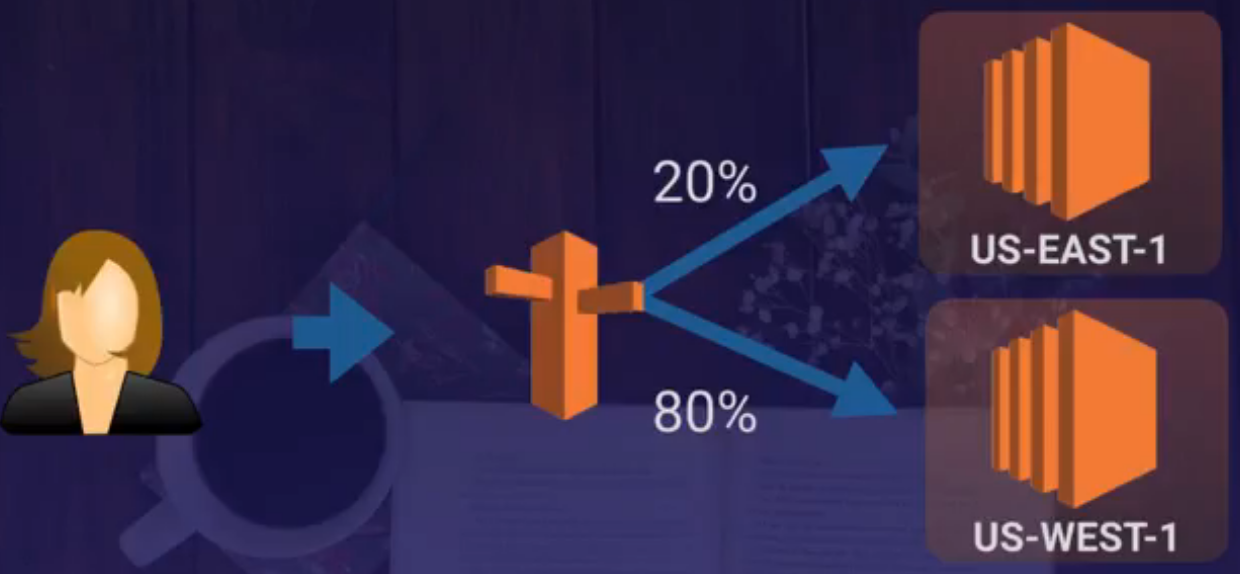
-
Heatlh checks :
- set health check on individual records sets
- if a record set fails a health check -> remove from route 53 until it passes it
- you can set sns notifications to alert you if a health check is failed
6. Latency Routing Policy :
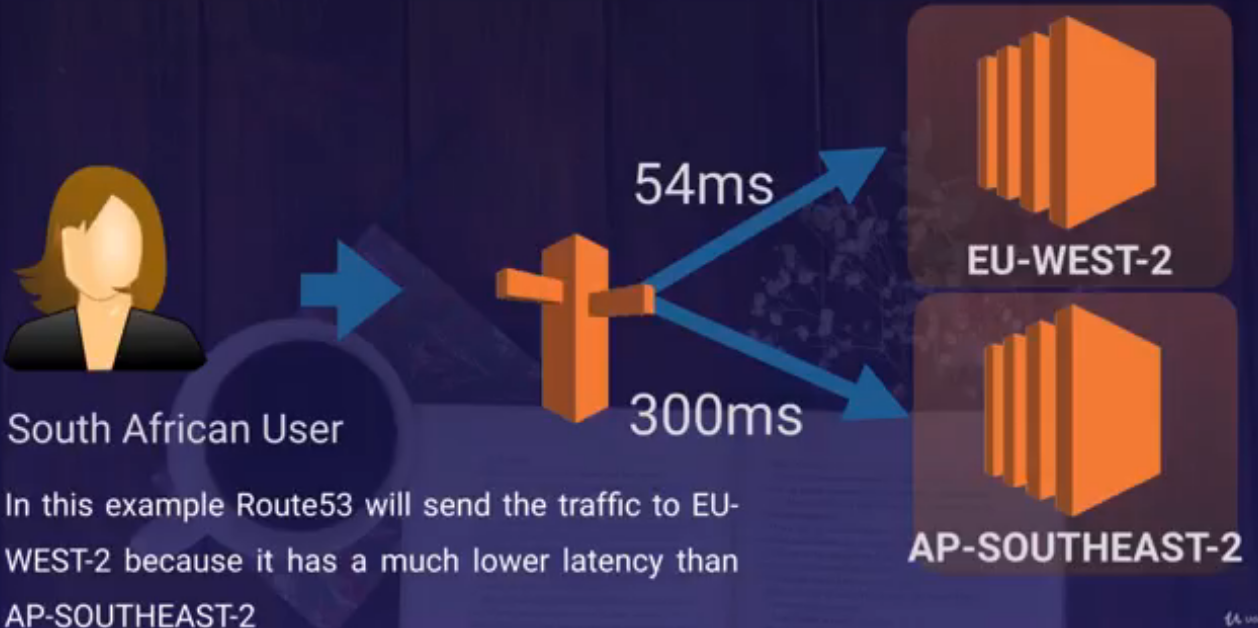
- Allow you to route your traffic based on the lowest network latency of your end used (= region will give them the fatest response time)
-
to use latency-based routing, you create a latency resource record set for the amazon EC2 (or ELB) resource in each region thath host you website
- route53 select latency resource record set for the region that gives the user the lowest latency
7. Failover Routing Policy
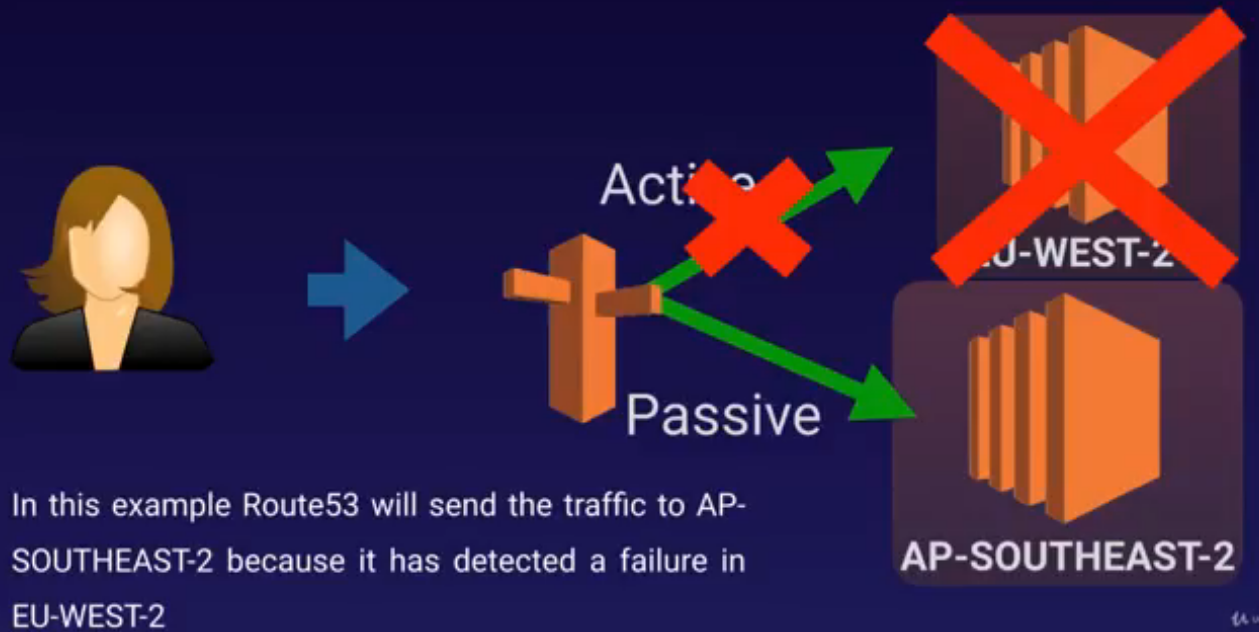
-
are used when you want to create an active /passive set up
- ex : you want your primary site to be in the EU-WEST-2 and your secondary DR site in AP-SOUTHEAST-2
- Route53 will monitor the health of yout primary site usin a health check
- a health check monitors the health of your end points
8. Geolocation Routing Policy
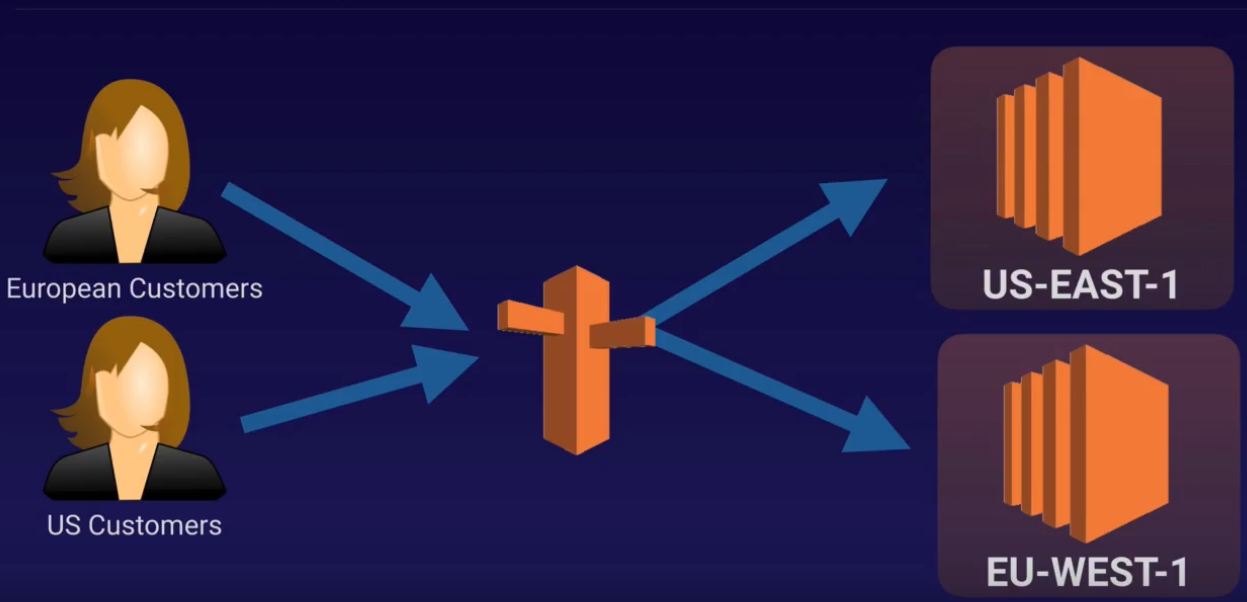
-
lets you choose where your traffic will be snet based on the geogrpahic location of your users (location from which DNS quieries originate)
- ex : you want all queries form europe to be routed to a fleet of the EC2 instance that specigivally configured for your European customers
- these servers may have the local language of your european customers and all prices are displayed in €
9. Geoproximity Routing Policy (Traffic Flow Only)
- lets Routets53 route traffic to your ressources bases on the geographic locaiton of your user and your resources
- biasi : a specific value which choose to route more or less traffic to a given resource. It can expands or shrink the size of the geographic region from which traffic is routed to a resource
- To use geoproximity routing, you must use Route 53 traffic flow
10. Multivalue Answer