



TP5-ASG
1. Autoscaling Theory
Definition
https://docs.aws.amazon.com/autoscaling/ec2/userguide/AutoScalingGroup.html
An Auto Scaling group :
-
is a collection of Amazon EC2 instances
- (that are treated as a logical grouping for the purposes of automatic scaling and management)
-
enables you to use EC2 Auto Scaling features :
- such as health check replacements
- and scaling policies.
-
its size (desired capacity) = number of its instances :
- between the minimum and maximum capacity specified in scaling policies
- adjustment possible
-
maintained by periodic health check
- If an instance becomes unhealthy, the group terminates the unhealthy instance and launches another instance to replace it
-
multiple Availability Zones :
- the desired capacity is distributed across them
- starts by launching enough instances to meet its desired capacity
spot vs on-demand instances
An Auto Scaling group can launch On-Demand Instances, Spot Instances, or both.
Spot Instances = Amazon EC2 capacity at steep discounts relative to On-Demand prices.
key differences :
- Spot price varies based on demand
-
Amazon EC2 can terminate an individual Spot Instance (in function of its availability / price)
- a Spot Instance is terminated -> a replacement instance is launched (to maintain the desired capacity)
3 components
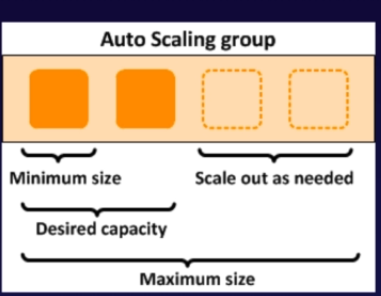
-
Group
- Logical component : webserver group or application group or database group
-
Configuration Templates
- group uses a launch template or a launch configuration as a config template for its EC2 instances
-
Scalling option
- Maintain current instance levels at all times
- Scalle manually
- Scale based on schedules
- Scale based on demand
- Use predictive scaling
launch configuration
We recommend that you use launch templates instead of launch configurations to make sure that you can use the latest features of Amazon EC2.
https://docs.aws.amazon.com/autoscaling/ec2/userguide/LaunchConfiguration.html
A launch configuration is an instance configuration template that an Auto Scaling group uses to launch EC2 instances.
When launch configuration creation, you specify information for the instances, including :
- the ID of the Amazon Machine Image (AMI),
- the instance type,
- a key pair,
- one or more security groups,
- and a block device mapping. .
You can specify your launch configuration with multiple Auto Scaling groups.
- one launch configuration for an Auto Scaling group at a time
-
you can not modify a launch configuration after you've created it :
- you have to recreated another and update your Auto Scaling group with it
When Auto Scaling group creation :
- specify a launch configuration,
- a launch template,
- or an EC2 instance (in this case, a launch configuration by default will be provided).
2. Autoscaling Groups Lab
ASG : Auto Scaling groups
Creating an Auto Scaling Group Using an EC2 Instance
https://docs.aws.amazon.com/autoscaling/ec2/userguide/create-asg-from-instance.html
When you create an Auto Scaling group, you must specify the necessary information to configure :
- the Amazon EC2 instances,
- the subnets for the instances,
- and the initial number of instances.
To configure Amazon EC2 instances, you can specify :
- a launch configuration,
- a launch template,
- or an EC2 instance.
When you create an Auto Scaling group using an EC2 instance, Amazon EC2 Auto Scaling creates a launch configuration for you and associates it with the Auto Scaling group.
This launch configuration :
- has the same name as the Auto Scaling group,
-
and it derives its attributes from the specified instance ;
- such as AMI ID,
- instance type,
- and Availability Zone.
Manual Scaling for Amazon EC2 Auto Scaling
https://docs.aws.amazon.com/autoscaling/ec2/userguide/as-manual-scaling.html
At any time, you can change the size of an existing Auto Scaling group manually. You can either :
- update the desired capacity of the Auto Scaling group,
- or update the instances that are attached to the Auto Scaling group.
Manually scaling your group can be useful when :
- automatic scaling is not needed
- or when you need to hold capacity at a fixed number of instances.
3. HA Architecture
HA : High Availability
You should always plan for failure
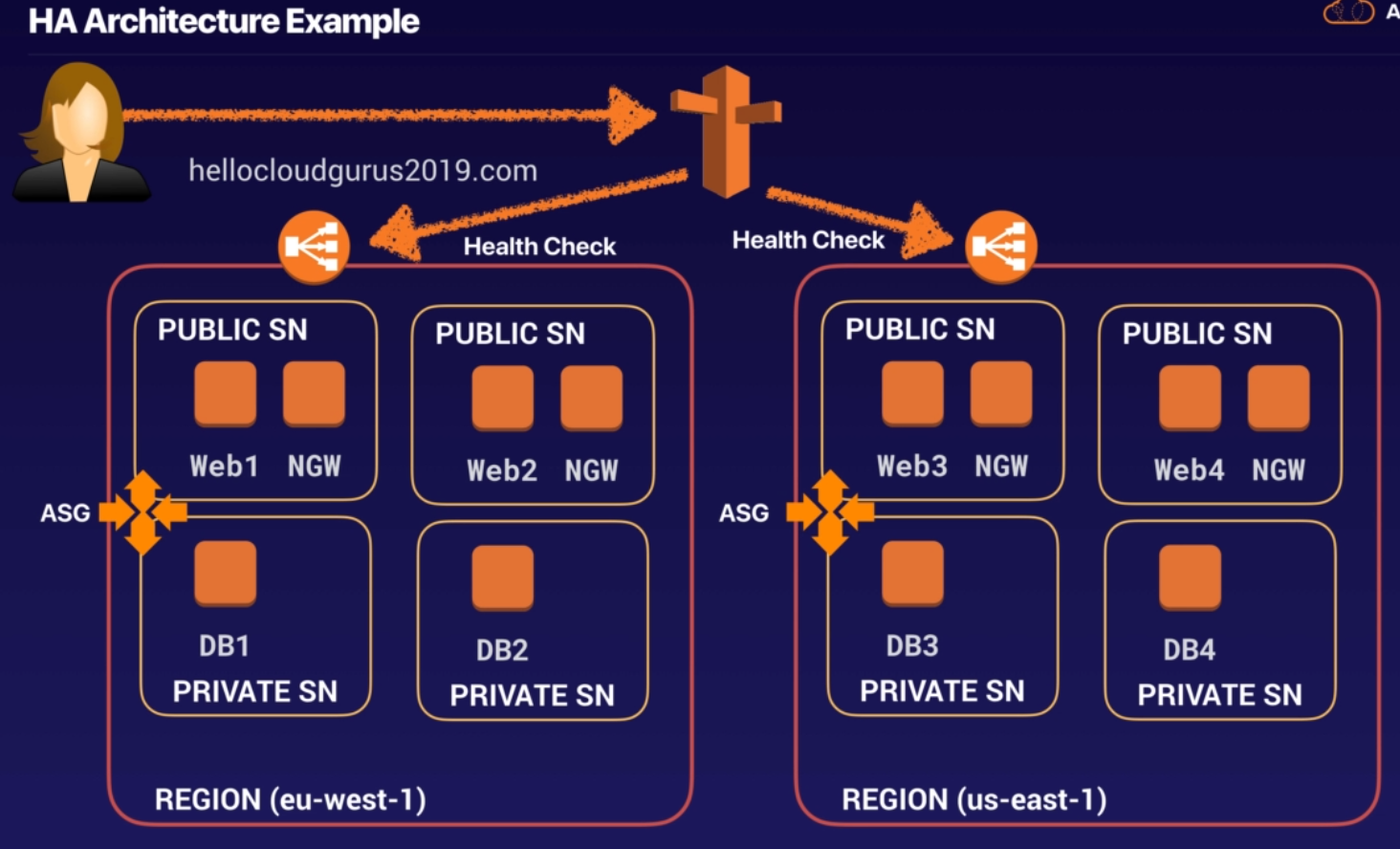
ASG : Auto Scalling group Each SN are in a different AZ
What is the ideal architecture for this environment, if we need a minimum of 6 instances and mustly available ?
- 3 AZ with 3 instances in each Z
synthesis
- Use multiple AZ and multiple Regions where ever you can
-
MultiAZ != ReadReplicas for RDS
- multiAZ : for disaster recovery
- readreplicas : for performance
-
Scalling out != scalling up
- out : use autoscaling group (we add additional EC2 instances inside our group)
- up : increase the resource inside the EC2 instance (T2macro to 6X increasing the amount of RAM or CPU)
- consider the cost elements
-
there are different S3 storage classes
-
higlhy available :
- Standard S3
- Standard S3 infrequently access
-
less available
- using redundancy storage
- S3 single AZ
-
4. Building a Fault Tolerant WP - HA Word Press Site
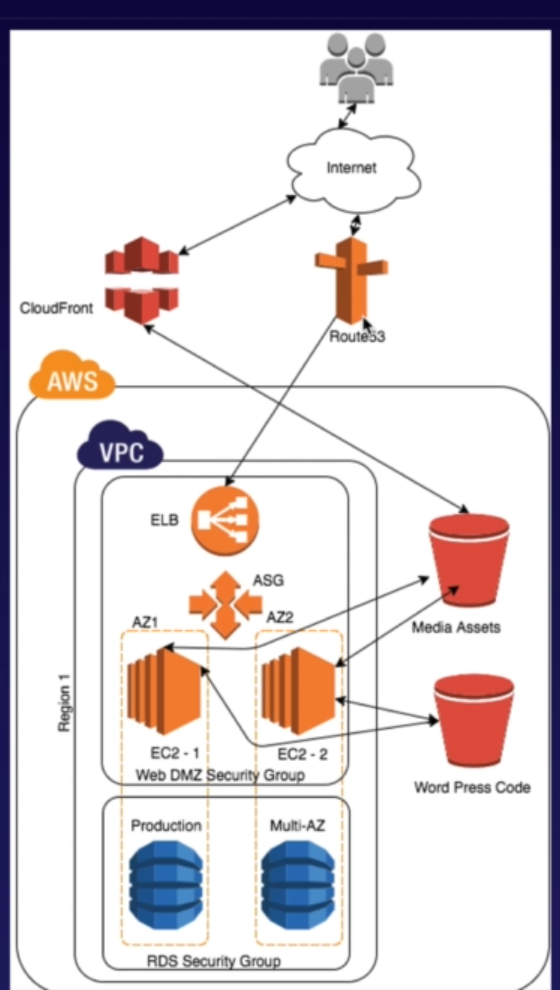
Steps :
- S3 bucket
- CloudFront
- VPC -> create a WEBDMZ security group (which allow mysql port)
- RDS database with multi-az deployment ; no public accessible; define initial database-name
- IAM (Identity Access Managment) -> create a new role
- Create an EC2 instance
At the final check the
- Clound FRont
- RDS
5. Building a Fault Tolerant WP - Setting Up EC2
Steps :
- configure the EC2 instance
- install on the EC2 WordPress
- create a post
- add to this post an image
- add a reduncancy by packing up this post to another S3 and checking the resilience between S3
-
rewrite url access
- edit the .htaccess file (add url rewrite rule out the cloud front)
- edit the httpd.conf file (allow the new url rewrite) (you can make a backup config of the folder)
- restart the server to force the change(
server httpd.service) - make the bucket public and edit the public access setting to allow all input traffic
- check in chrome web explorer that the url rewrite has been well done
- create a LoadBalancer
- put the EC2 behind a LoadBalancer
- Set up Route53
- (optional) you can create a record set to save the dns domain to have a simpler url
6. Building a Fault Tolerant WP - Adding Resilience And Autoscaling
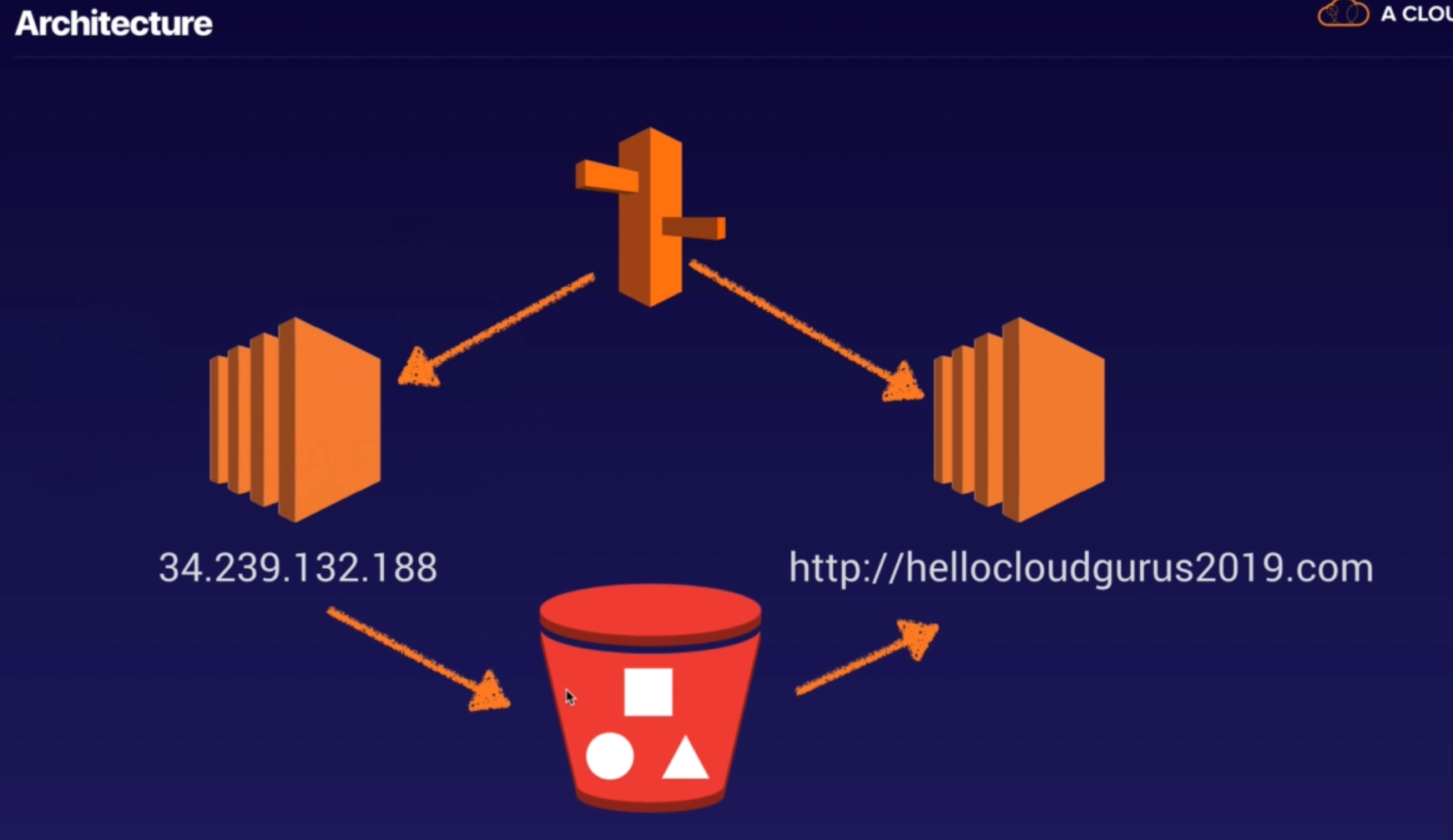
We have 2 isntances :
- for Reading Note
- for Writting Note
Steps :
-
edit the etc/crontab file (automating windows tasks) :
- Scan EC2 and copy to S3 every changes (sync to S3 with a perfect copy ->
sync --delete EC2from s3to) - send the image to the cloundfront ass well (sync to S3 with a perfect copy ->
sync --delete EC2from s3to) - trigger the update task of crontab :
restart cron.service
- Scan EC2 and copy to S3 every changes (sync to S3 with a perfect copy ->
-
Create an Autoscaling group
- Create a launch configuration with IAM role of S3 access
- Create the Autoscaling group with IAM S3 access
- Edit the target group from the Autoscaling group
-
edit the etc/crontab file (automating windows tasks) : 1. Scan S3 and load every changes (sync to EC2 with a perfect copy ->
sync --load s3from EC2to)- trigger the update task of crontab :
restart cron.service
- trigger the update task of crontab :
7. Building a Fault Tolerant WP - Cleaning Up
By doing a reboot you can force a failover from one AZ to another AZ
Steps
- Reboot
- Delete RDS database,
- Delete Autoscaling which trigger EC2 Instance deleting (except the reading Note)
- Delete your target group
- Delete Application Load Balancer (which you relied to your target group)
- Delete the EC2 instance (the Writting note)
- Delete the cloudfront distribution