



1. Elastic Container Service
Container
- Containers = similar to a virtual machine, but more like virtual operating environment with everything the software needs to run
- Standardized = a standardized unit with software and things they need to run (librairies, system tools, code, runtime)
- microservices = applications are created using independant stateless components or microservice running in containers
- Docker (Linux) or Windows containers
Building a software as microservices
Microservices are an architectural and organizational approach to software development in which software is composed of small, independent services that communicate over well-defined APIs. These services are owned by small, self-contained teams.
Microservices architectures make applications easier to scale and faster to develop. This enables innovation and accelerates time-to-market for new features.
Containers provide isolation and packaging for software. Consider using containers to achieve more deployment velocity and resource density.
the characteristics of a microservices architecture include the following :
• Componentization via services • Organized around business capabilities • Products not projects • Smart endpoints and dumb pipes • Decentralized governance • Decentralized data management • Infrastructure automation • Design for failure • Evolutionary design
Architecture of a Docker container :
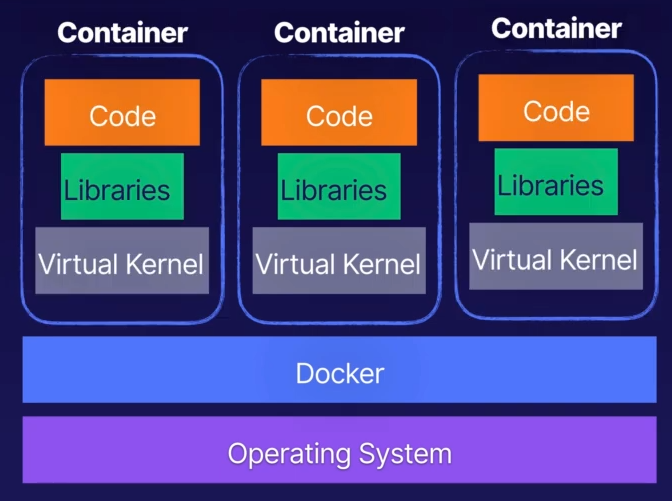
Advantages of Containers & Microservices Architectures
- Highly Scalable (scall only the servies you need to)
- Fault Tolerant (a single error in one of your containers should not bring down your entire app)
- Easy to Maintain
ECS = Elastic Container Service
A container orchestration service which support Docker and Windows containers
It is a fully managed clustered platform which allows you to run your Docker Images in the cloud.
It is similar to Kubernets, but with dep integration with AWS
Fargate or EC2 ?
- Custers of Virtual Machines
- Fargate for serverless
- EC2 for More control (installation configuration and management control)
ECR = Elastic Conteiner Registry
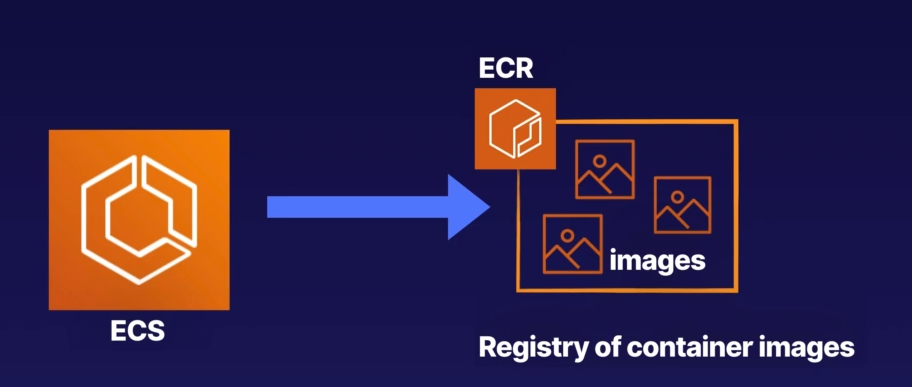
this is where you can store your container images (Doker or Windows)
Amazon Services which use ECS
-
Amazon Sagemaker
- machine learning for training and interference jobs
-
Amazon Lex
- deeplearning to build conversational interfaces
-
Amazon.com
- recommandation
2. Docker and CodeBuild Lab Part 1
Docker = Open Source Techology which allows to create applications based on either Linux or WIndows containers
AWS CodeBuil = build services which runs a set of commands that you define : ex compile codres, runs test producted artifcat that are ready to deploy
Create a cluster
An Amazon ECS cluster is a regional grouping of one or more container instances on which you can run task requests. Each account receives a default cluster the first time you use the Amazon ECS service. Clusters may contains more than one Amazon EC2 instance type.
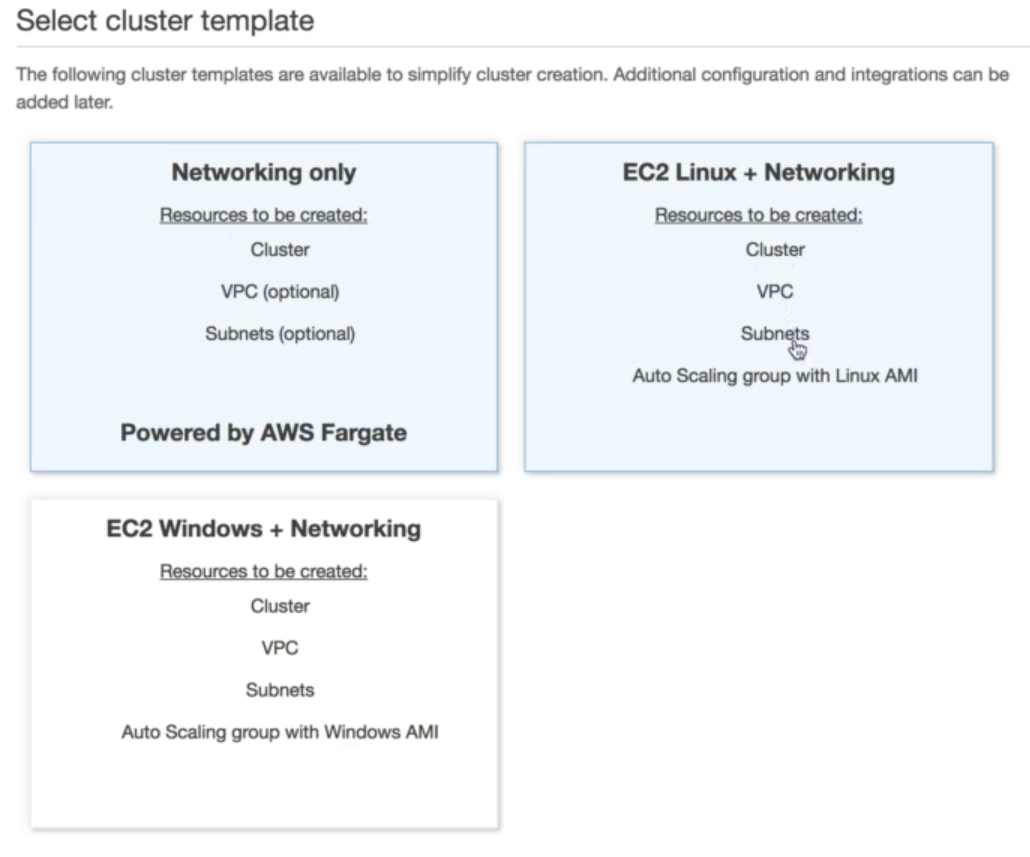
Steps configuration :
- Instance configuration
- Networking
-
Container instance IAM role
- The Amazon ECS makes calls to the ECS API actions on your behalf
template available
https://docs.aws.amazon.com/fr_fr/AmazonECS/latest/developerguide/create_cluster.html
-
Mise en réseau uniquementFargate Avec cette option, vous pouvez lancer un cluster avec un nouveau VPC à utiliser pour les tâches –. Les fournisseurs de capacité FARGATE et FARGATE_SPOT sont automatiquement associés au cluster. Pour de plus amples informations, veuillez consulter Fournisseurs de capacité AWS Fargate.
- Vous pouvez exécuter des tâches à l'aide du type de lancement Fargate. Le type de lancement Fargate vous permet d'exécuter les applications conteneurisées sans avoir à allouer et à gérer l'infrastructure backend. Lorsque vous exécutez une tâche avec une définition de tâche compatible Fargate, Fargate lance les conteneurs pour vous.
- EC2 Linux + Mise en réseauEC2 Avec cette option, vous pouvez lancer un cluster de tâches avec le type de lancement – à l'aide des conteneurs Linux. Le type de lancement EC2 vous permet d'exécuter vos applications conteneurisées sur un cluster d'instances Amazon EC2 que vous gérez.
- EC2 Windows + Mise en réseau – Avec cette option, vous pouvez lancer un cluster de tâches avec le type de lancement EC2 et des conteneurs Windows. Le type de lancement EC2 vous permet d'exécuter vos applications conteneurisées sur un cluster d'instances Amazon EC2 que vous gérez. Pour de plus amples informations, veuillez consulter Conteneurs Windows.
push command for docker repository
Steps :
- Login
- Build your Docker Image
- tag your images
- Push your image
create a task definition
A task definition specifies which container are included in your task and how they interact with each other.
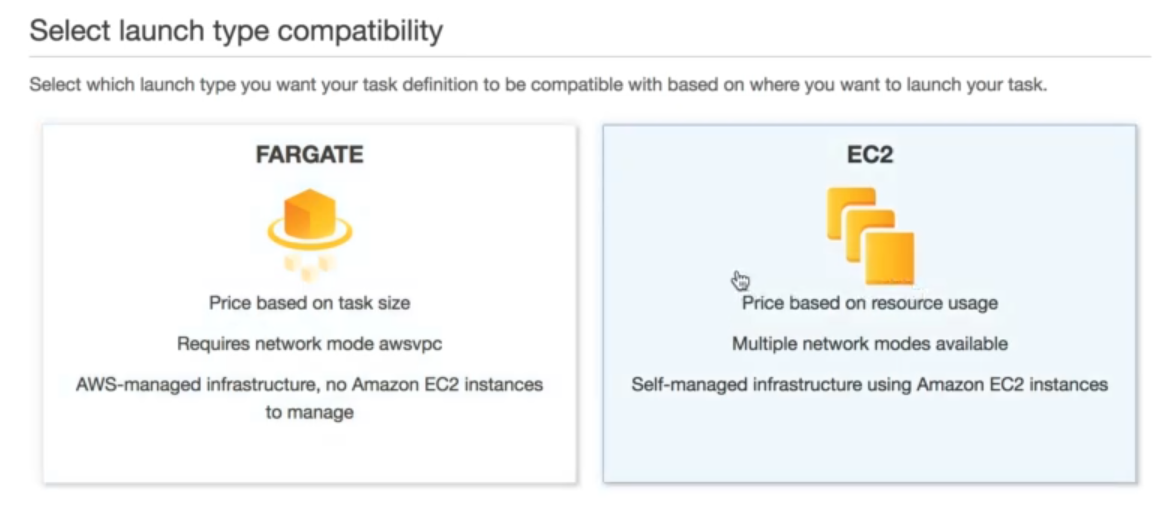
Steps configuration :
- Container definition
- Task execution IAM role
- Task size
- Add container from a given image ([registry-url]/[namespace]/[image]:[tag])
3. Docker and CodeBuild Lab Part 2
code build phases
- pre_build
- build
- post_build