



1. Serverless 101
A brief history of cloud
Avant 3 à 6 mois pour installer infrastructure physique maintenant en 2 semaines avec le cloud por les mêmes performances
Main steps of cloud history :
- Data Centre
- IAAS : EC2 instances in 2006 -> there are still infrastructures to run
- PAAS : Azure = Run the code for you (do not worry about architecture)
- Containers -> Scaling & deployment to a server
- Serverless computing (lambda) = massive parallel way provisioning and management of the platform
Serverless
The future is transitioning from 3-tiered architectures to thick-client apps connected to cloud-based microservice functions.
We go from this :
The “thin-clients” display the user interfaces and the business logic and heavy lifting happens in a cloud-based server farm somewhere. It’s typical 3-tier architecture, with the weight of the heavy lifting residing in the back-end.
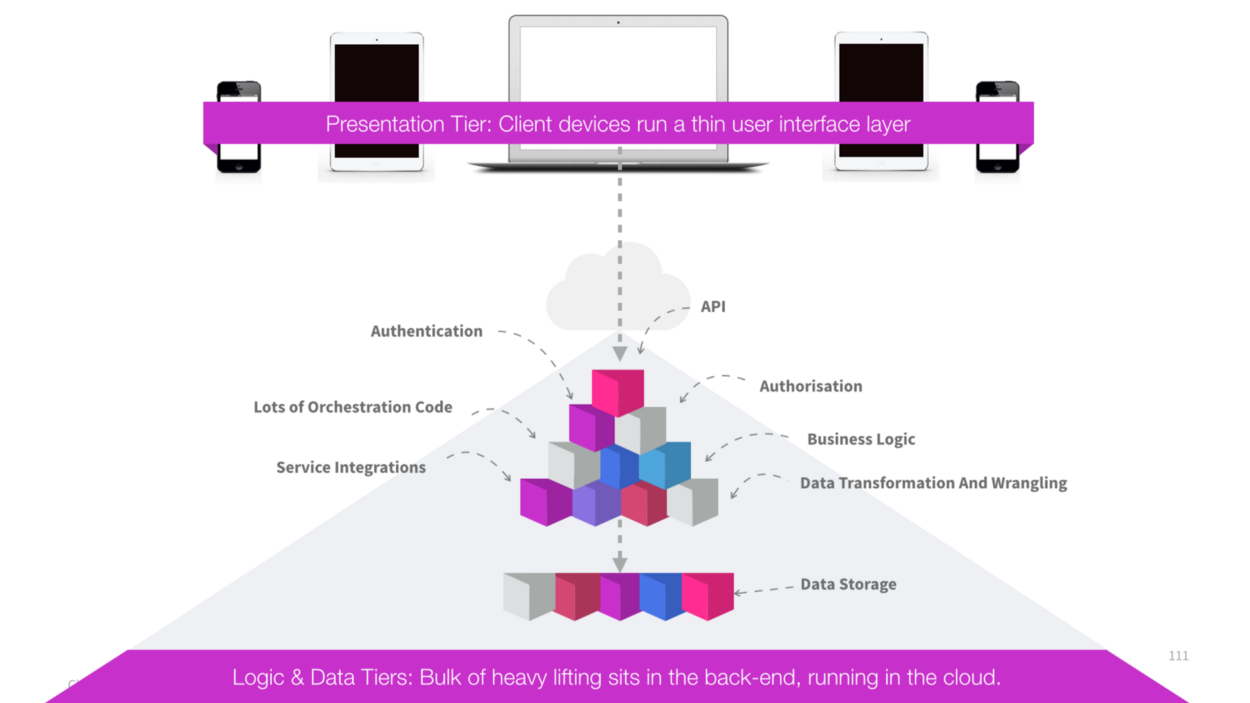
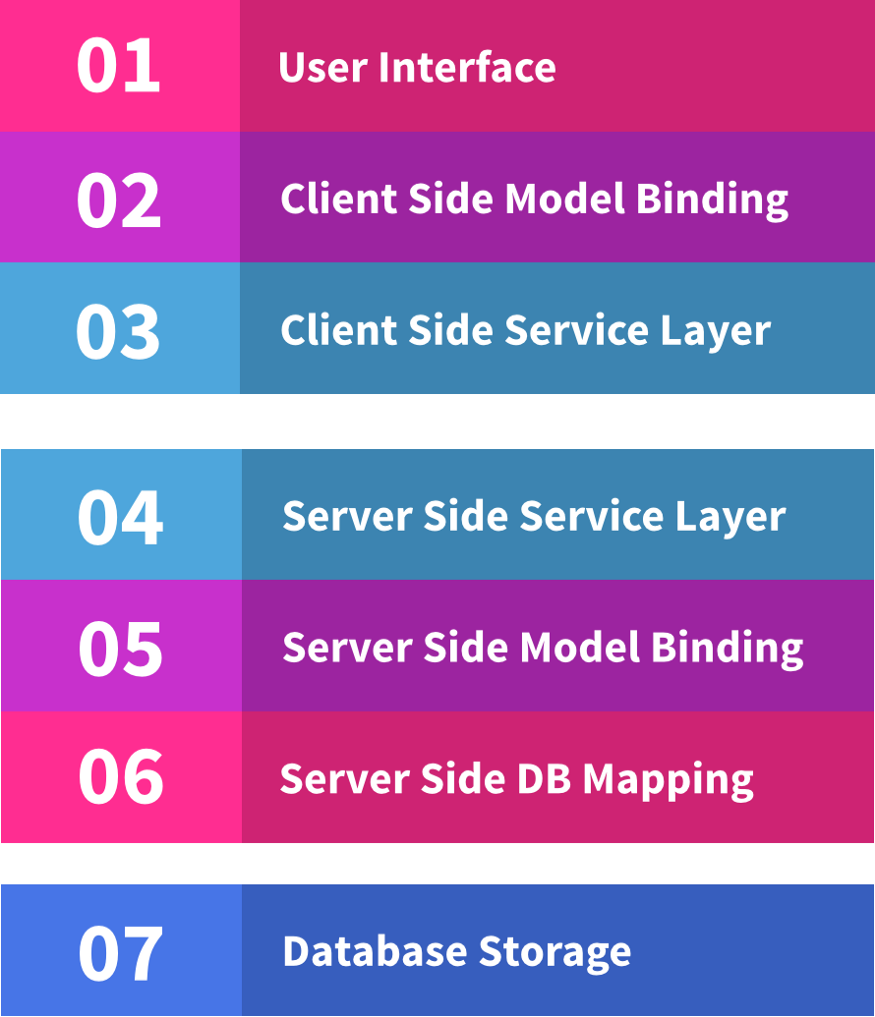
The user interface really just serves as a convenient way for the user to drive functions in the back-end. But this is inefficient to build — there’s a huge amount of duplication.
If you want to add a new feature to the product you have to touch every layer through the stack, from the user interface over the wire to the server and then again over to the data-store. Look at all of the layers:
to this :
This future is characterized by rich thick-client applications talking directly to cloud data stores and small cloud-based micro-services for protected workloads & service orchestration.
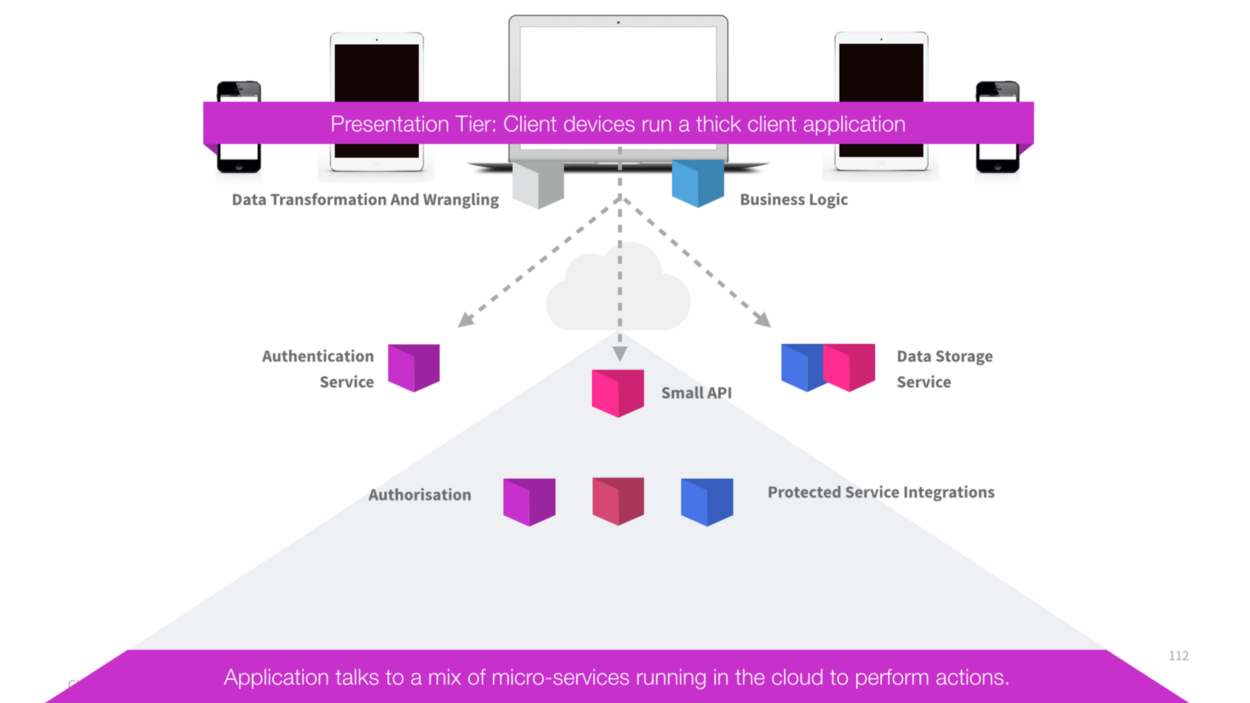
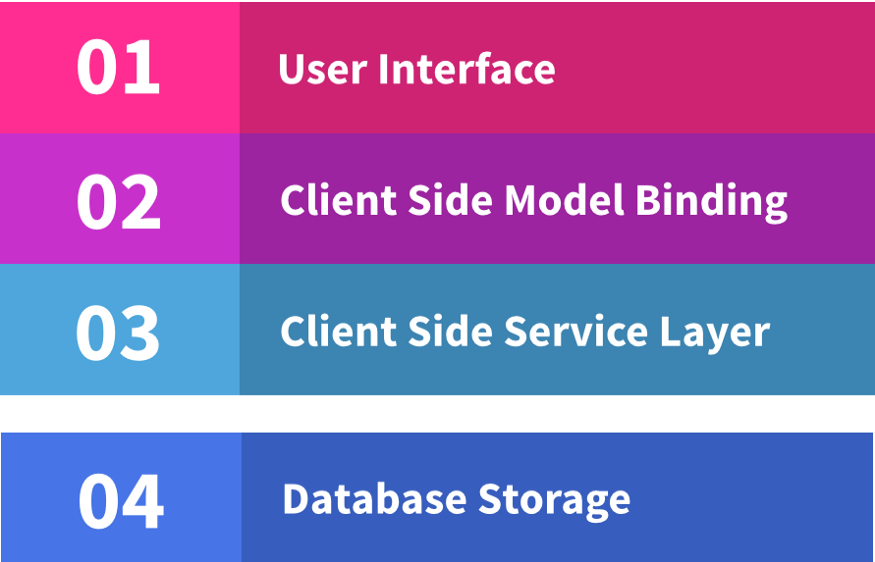
Now when you want to add a new feature, you only need to add it to your front-end code (and potentially call out to cloud services where required). Look how few layers you need to touch now:
2. Lambda
Exécutez du code sans vous soucier des serveurs. Payez uniquement pour le temps de calcul consommé.
Without Lambda we have to deal with :
- Data centers
- Hardware
- Assembly Code Protoclas
- High Level Langages
- Operating systems
- Application Layer / AWS APIs
Whit Lambda :
- Aucun serveur à gérer
- Dimensionnement continu
- Calcul au millième de seconde
- Performances homogènes
- Cela devient Economique
definition
Lambda is :
- compute service where you can upload your code and create a Lambda functions
- AWS take care of prosioning and managing servers that you use to run the code
Running code
Lambda runs wiht :
- Node.js
- Java
- Python
- C#
- Go
Price
In function of :
-
number of request
- 1st million request are free then $0.20 per 1 million request thereafter
-
duration
- from the time your code begins executing untill it return or terminates, ronded up to the nearest 100ms X amount of memory allocated.
Uses cases
You can use Lambda in the following ways :
- as en event-driven compute service where AWS Lambda runs your code in response to events
- as a compute serviceto run your code in response to HTTP request using Amazon API Gateway or API calls made using AWS SDKs
Traitement de données
Vous pouvez utiliser AWS Lambda pour exécuter du code en réponse à certains déclencheurs, tels que la modification de données, un changement d'état au niveau du système ou encore une action effectuée par l'utilisateur. Lambda peut être activé directement par des services AWS comme S3, DynamoDB, Kinesis, SNS et CloudWatch, peut se connecter à des systèmes de fichiers EFS existants ou peut être orchestré en flux de travail par AWS Step Functions. Vous pouvez ainsi développer un large éventail de systèmes de traitement de données sans serveur en temps réel.
Traitement des fichiers en temps réel
Vous pouvez utiliser Amazon S3 pour déclencher AWS Lambda afin que les données soient immédiatement traitées après leur chargement. Vous pouvez également vous connecter directement à un système de fichiers Amazon EFS existant afin d'activer l'accès parallèle massif pour le traitement des fichiers à grande échelle. Par exemple, vous pouvez utiliser Lambda pour créer des images miniatures, transcoder des vidéos, indexer des fichiers, traiter des journaux, valider des contenus ou encore agréger et filtrer des données en temps réel.
main steps to set up Lambda
- Create and Open the Environment
- Create the Lambda Function and API
- Add Code to the Function
- Run or Debug the Function Locally
- Run or Debug the API Locally
- Run the Function in Production
- Run the API in Production
- Change the Function and Deploy the Change
- Clean Up
lambda function creation
A function is a resource that you can invoke to run your code in AWS Lambda. A function has code that processes events, and a runtime that passes requests and responses between Lambda and the function code. You provide the code, and you can use the provided runtimes or create your own.
- Set Up Your IAM Group with Required Access Permissions
- Set Up Your Environment with Your AWS Access Credentials
- Create an Execution Role for Your Lambda Functions
- Set Your Environment to the Correct AWS Region
- Open the Lambda Section of the AWS Resources Window
3 main ways to triggers Lambda
Pour déclencher une fonction lambda, vous pouvez choisir entre de nombreuses façons différentes. Voici les 3 façons les plus courantes :
- L'événement API Gateway est l'une des façons de déclencher une fonction Lambda. Ces événements sont considérés comme des événements classiques. En termes simples, cela signifie que lorsque quelqu'un appelle une passerelle API, cela déclenchera votre fonction lambda. Pour que la fonction Lambda sache quel type d'événement la déclenchera, vous devez d'abord la définir dans la configuration, ou dans le fichier serverless.yml si vous utilisez le Serverless Framework.
- Les événements S3 se produisent lorsque quelqu'un (ou quelque chose) modifie le contenu d'un seau S3. La modification du contenu peut être réalisée en créant, en supprimant ou en mettant à jour un fichier. Lorsque vous définissez un événement, vous pouvez spécifier le type d'action qui déclenchera la fonction lambda, qu'il s'agisse de créer, de supprimer ou de mettre à jour un fichier.
-
Les événements DynamoDB : Lorsqu'il y a des données dans le flux, il y a deux façons différentes dont le lambda sera déclenché par celui-ci :
- lorsqu'il y a des données dans le flux, ce qui signifie qu'à un certain moment il y a un seul changement dans la base de données, le lambda ne sera exécuté qu'une seule fois.
- lorsqu'il y a un lot d'événements dans le flux qui seront tous traités ensemble. Cette méthode permet de gagner beaucoup de temps d'exécution car les flux de traitement sont assez rapides.
Le flux de la table Dynamo est comme une ligne ou une file d'attente dans laquelle les données circulent.
-
Dans ce cas particulier, les "données" sont en fait la modification apportée à une table spécifique : mise à jour d’un enregistrement dans une table DynamoDB ->
- tous ces changements seront publiés dans un flux
- et le lambda sera déclenché parce qu'il y a des données dans le flux.
to remember
- L scales out (not up) automatically
- L functions are independent -> 1 event = 1 function
- L is serverless
- L functions can trigger other L function -> 1 event can = x function
- L can do things globally : you can use it to back up S3 buckets to other S3 buckets
3. AWS API Gateway
Créer, maintenir et sécuriser des API à n'importe quelle échelle
types of API
-
REST APIs = REpresentation State Transfer
- Créez des API RESTful optimisées pour des charges de travail sans serveur et des backends HTTP à l'aide d'API HTTP. Les API HTTP constituent le meilleur choix pour créer des API qui nécessitent une fonctionnalité de proxy d'API. Si vos API REST nécessitent une fonctionnalité de proxy d'API et de gestion d'API dans une seule solution, API Gateway fournit également des API REST.
-
SOAP APIs = Simple Object Access Protocol
- Créez des applications de communication bidirectionnelle en temps réel, telles que des applications de chat et des tableaux de bord de streaming, à l'aide d'API WebSocket. API Gateway maintient une connexion permanente pour gérer le transfert de messages entre votre service backend et vos clients.
AWS API Gateway definition
Amazon API Gateway is an AWS service for creating, publishing, maintaining, monitoring, and securing REST, HTTP, and WebSocket APIs at any scale. API developers can create APIs that access AWS or other web services, as well as data stored in the AWS Cloud. As an API Gateway API developer, you can create APIs for use in your own client applications. Or you can make your APIs available to third-party app developers.
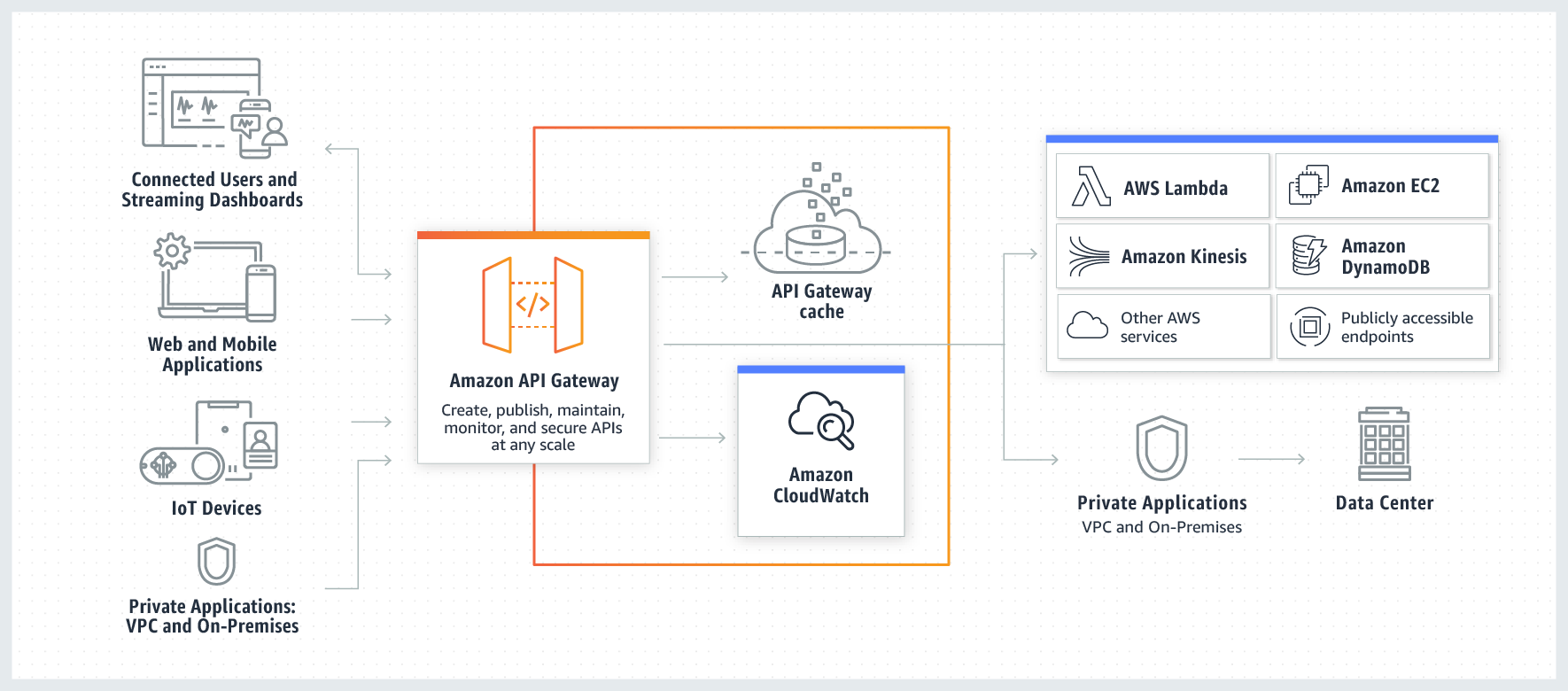
This diagram illustrates how the APIs you build in Amazon API Gateway provide you or your developer customers with an integrated and consistent developer experience for building AWS serverless applications. API Gateway handles all the tasks involved in accepting and processing up to hundreds of thousands of concurrent API calls. These tasks include traffic management, authorization and access control, monitoring, and API version management.
API Gateway acts as a "front door" for applications to access data, business logic, or functionality from your backend services, such as workloads running on Amazon Elastic Compute Cloud (Amazon EC2), code running on AWS Lambda, any web application, or real-time communication applications.
How to configure an API Gateway
- definte an API (container)
- Define Resources and nester Resoures (URL paths)
-
For each resource :
- Select supported HTTP methods (verbs)
- Set security
- Choose target (as EC2 Lambda, DynamoDB...)
- Set request and response transformation
-
Deploy API to a stage
- Use API Gateway domain, by default
- can use custom domain
- now supports AWS Certificate Manager : (whitout SSL/TLS certs)
API Gateway caching
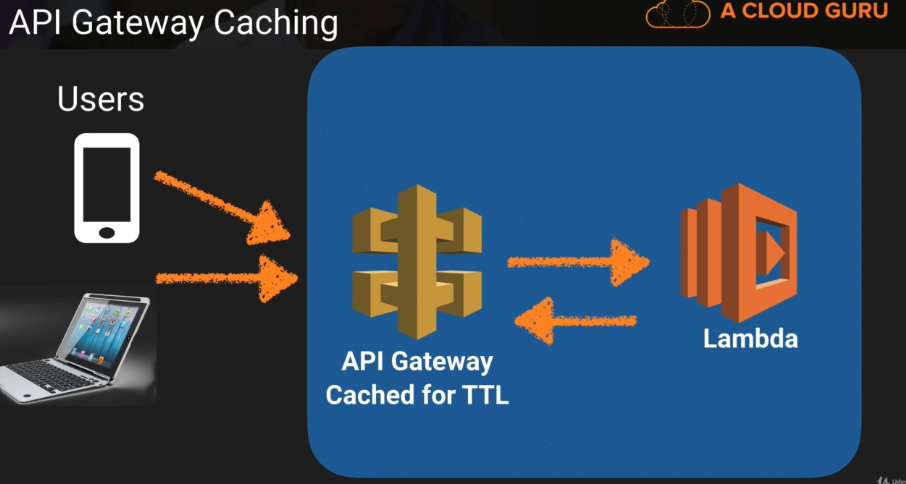
You can enable API caching in Amazon API Gateway to cache your endpoint's responses. With caching, you can reduce the number of calls made to your endpoint and also improve the latency of requests to your API.
When you enable caching for a stage, API Gateway caches responses from your endpoint for a specified time-to-live (TTL) period, in seconds. API Gateway then responds to the request by looking up the endpoint response from the cache instead of making a request to your endpoint. The default TTL value for API caching is 300 seconds. The maximum TTL value is 3600 seconds. TTL=0 means caching is disabled.
security
-
- partage de ressources entre origines multiples est un mécanisme qui permet à des ressources restreintes d'une page web, d'être récupérées par un autre domaine extérieur au domaine à partir duquel la première ressource a été servie
-
- politique de même origine est une méthode de contrôle utilisée par les navigateurs web pour pallier certains problèmes de sécurité.
- Cross-Site Scripting
4. Build a Simple Serverless Website with Route 53, API Gateway, Lambda and S3
Properties of the bucket from AWS S3 are :
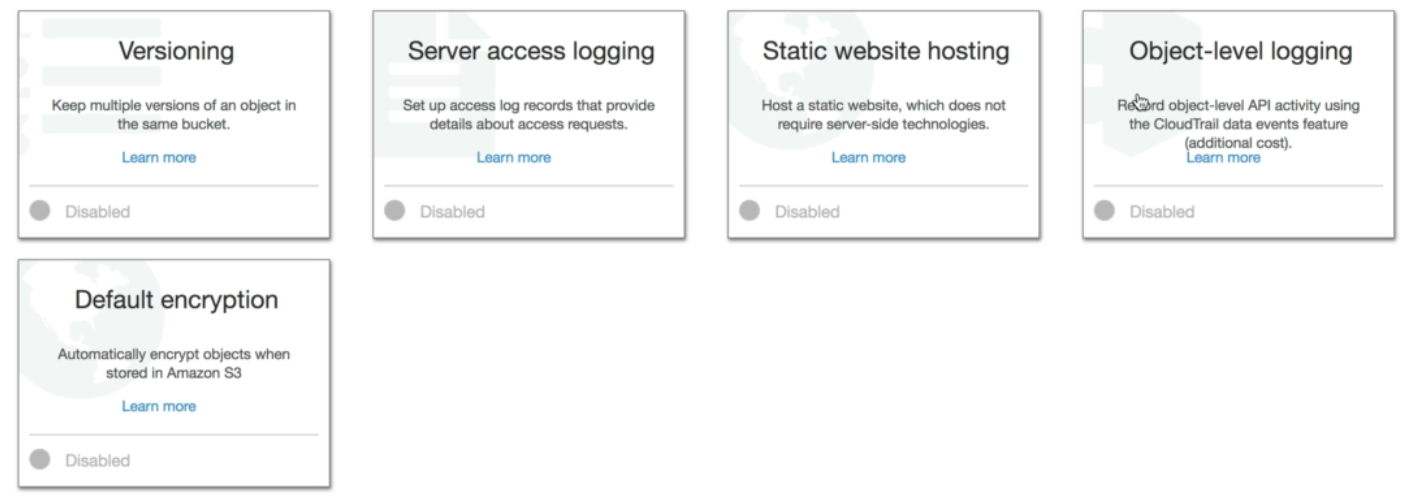
The bucket name must be the same than the domain name You can use the S3 url as well
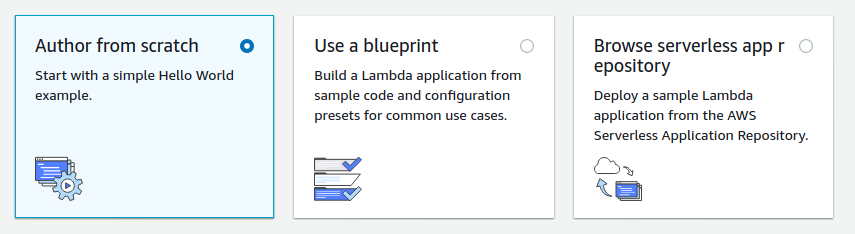
To create a lambda function you have to choose on of the following ways :
5. Version Control With Lambda
- With versionning, you can work with differetn variation of your Lambda function in your development workflow (beta dev, production)
- Each Lambda function version has a unique ARN.
- After publishing a lambda function, you can not modify its version.
- $LATEST Tracks The Most Recent Updates
- Lambda functions deployed using SAM templates will automatically add a new version (and update $LATEST).
Versioning
You can use versions to manage the deployment of your AWS Lambda functions. For example, you can publish a new version of a function for beta testing without affecting users of the stable production version.
The system creates a new version of your Lambda function each time that you publish the function. The new version is a copy of the unpublished version of the function. The function version includes the following information:
- The function code and all associated dependencies.
- The Lambda runtime that executes the function.
- All of the function settings, including the environment variables.
- A unique Amazon Resource Name (ARN) to identify this version of the function.
To create a new version of a function
- Open the Lambda console Functions page
- Choose the function that you want to publish.
- In Actions, choose Publish new version.
Qualified and Unqualified ARNs
- ARN : Amazon Resource Name
- Quali : the function of ARN with the version suffix ($LATEST)
- Unquali : without the version suffix
Alias
You can create one or more aliases for your AWS Lambda function. A Lambda alias is like a pointer to a specific Lambda function version. Users can access the function version using the alias ARN.
You can split traffic using aliases to different versions : you cannot split traffic with $latest, instead create an alias to latest
6. Make an Alexa Skill Lab
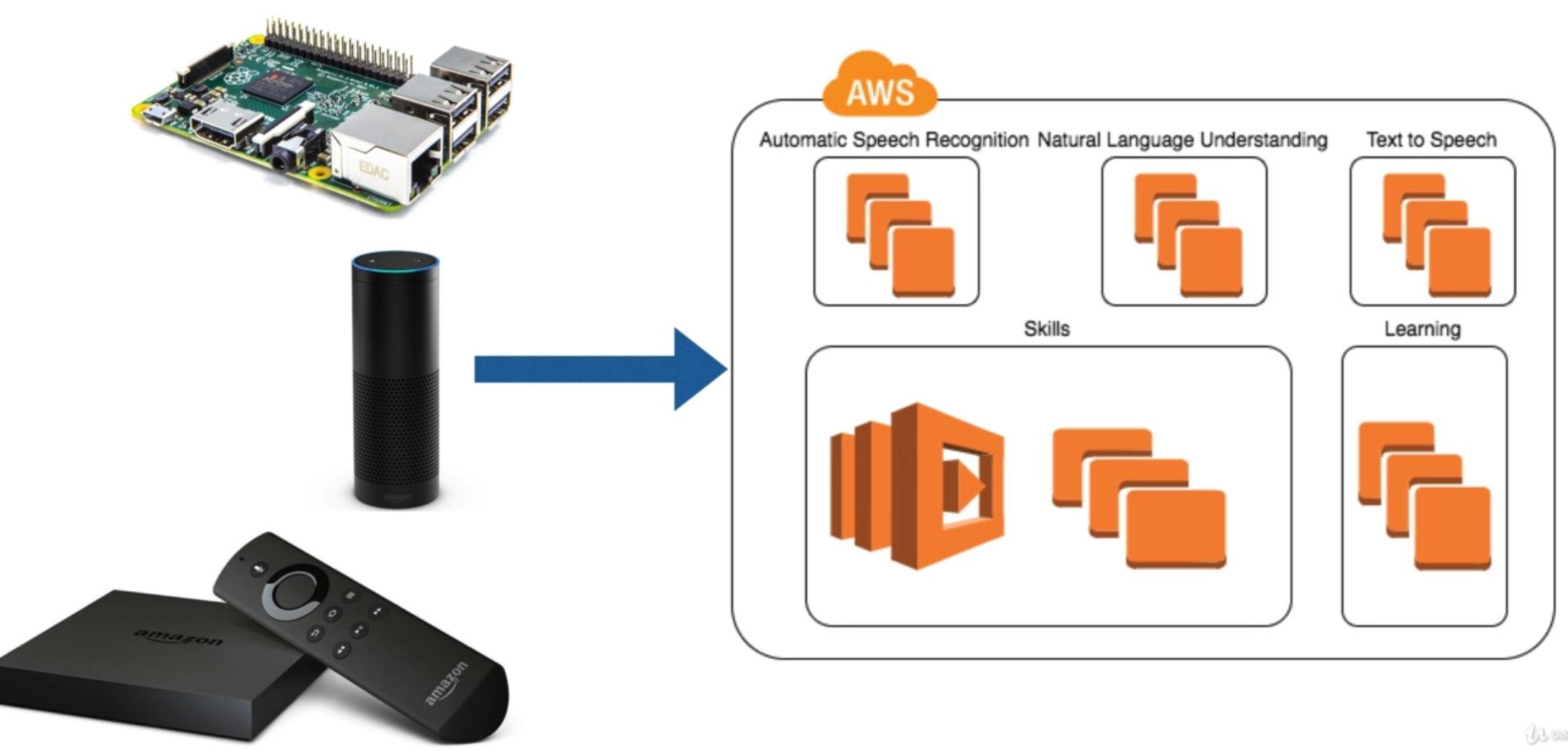
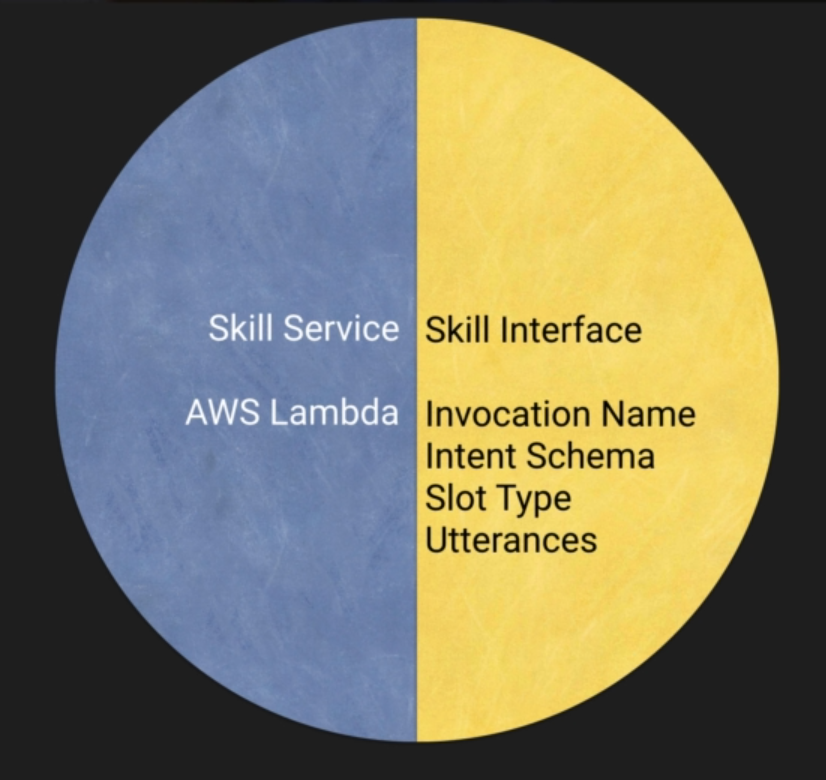
Alexa introduction
7. Step Functions
Développez des applications distribuées à l'aide de workflows visuels
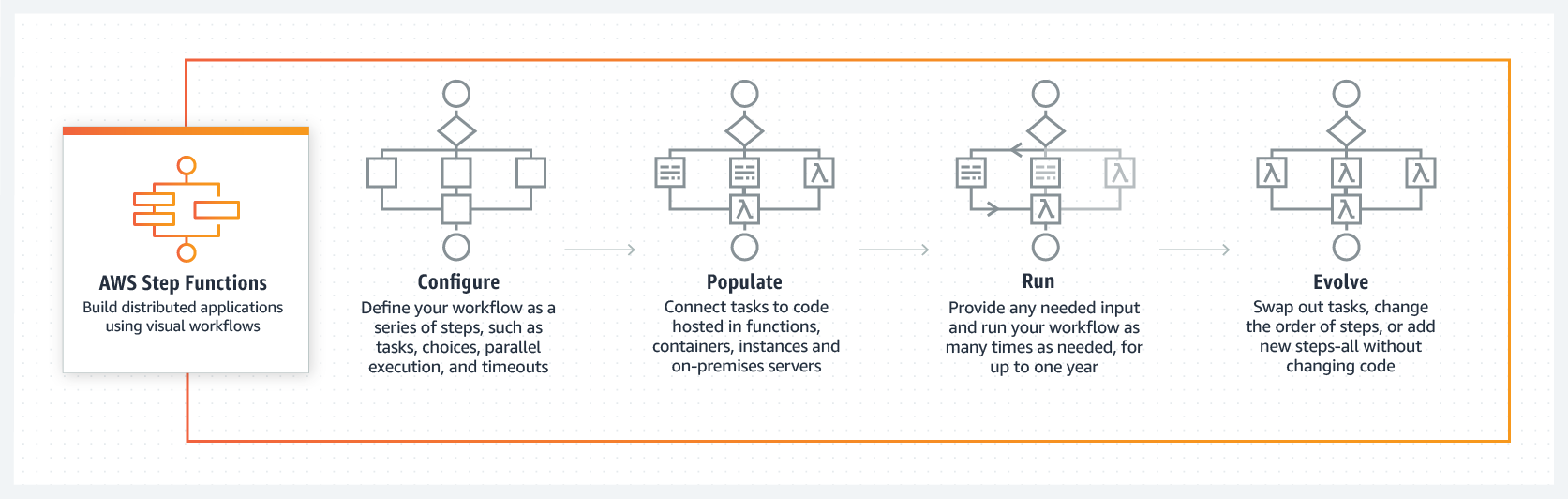
AWS Step Functions is a web service that enables you to coordinate the components of distributed applications and microservices using visual workflows. You build applications from individual components that each perform a discrete function, or task, allowing you to scale and change applications quickly.
Step Functions provides a reliable way to coordinate components and step through the functions of your application. Step Functions offers a graphical console to visualize the components of your application as a series of steps. It automatically triggers and tracks each step, and retries when there are errors, so your application executes in order and as expected, every time. Step Functions logs the state of each step, so when things go wrong, you can diagnose and debug problems quickly.
Step Functions manages the operations and underlying infrastructure for you to ensure your application is available at any scale.
avantages
Créer et mettre à jour rapidement des applications
AWS Step Functions vous permet de créer des flux de travail visuels pour traduire rapidement les exigences de l'entreprise en exigences techniques. Vous pouvez créer des applications en quelques minutes, et lorsque les besoins évoluent, permuter ou réorganiser des composants sans personnaliser le code.
Améliorer la résilience
AWS Step Functions gère l'état, les points de contrôle et les redémarrages pour s'assurer que votre application s'exécute dans l'ordre et comme prévu. Les fonctions intégrées try/catch, les capacités de nouvelle tentative et de restauration traitent automatiquement les erreurs et les exceptions.
Écrire moins de code
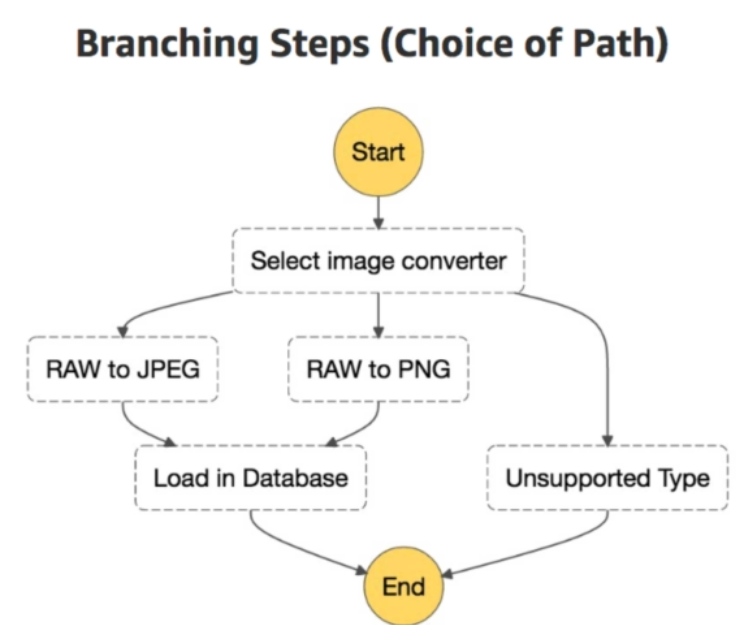
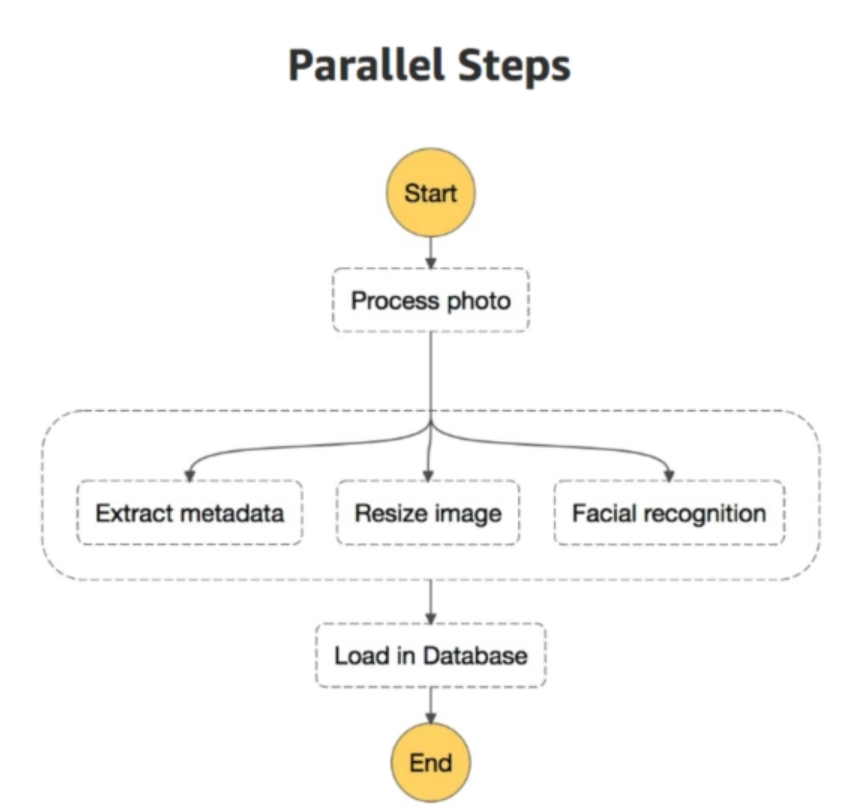
AWS Step Functions gère la logique de votre application pour vous, et implémente des primitives de base telles que la ramification, l'exécution parallèle et les délais d'attente. Cela permet de supprimer le code excédentaire qui peut être répété dans vos microservices et vos fonctions.
fonctionnement
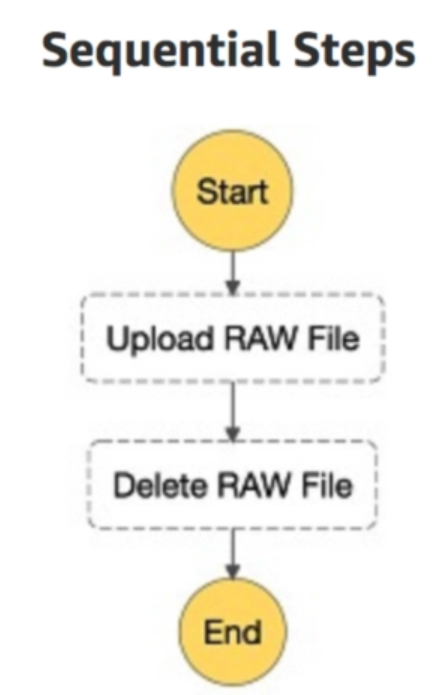
sequential steps
branching steps
parallel steps
how it works
- Define the steps of your workflow in the JSON-based Amazon States Language. The visual console automatically graphs each step in the order of execution.
- Start an execution to visualize and verify the steps of your application are operating as intended. The console highlights the real-time status of each step and provides a detailed history of every execution.
- AWS Step Functions operates and scales the steps of your application and underlying compute for you to help ensure your application executes reliably under increasing demand.
to remember
- great way to vizualize your serverless application
- SF automatically triggers and tracks each step
- SF logs the state of each step, so when things go wrong, you can diagnose what went wrong and when.
8. AWS X-Ray
Analyse et débogage de production, applications distribuées
when to use it
As AWS X-Ray collects data about your request that your application uses, you use it to get informations like :
- identifying isues and opportunities for optimization
- visualize your serverless application with filter and gain insights
- identify what is not working or what is slow
X-Ray ARchitecture
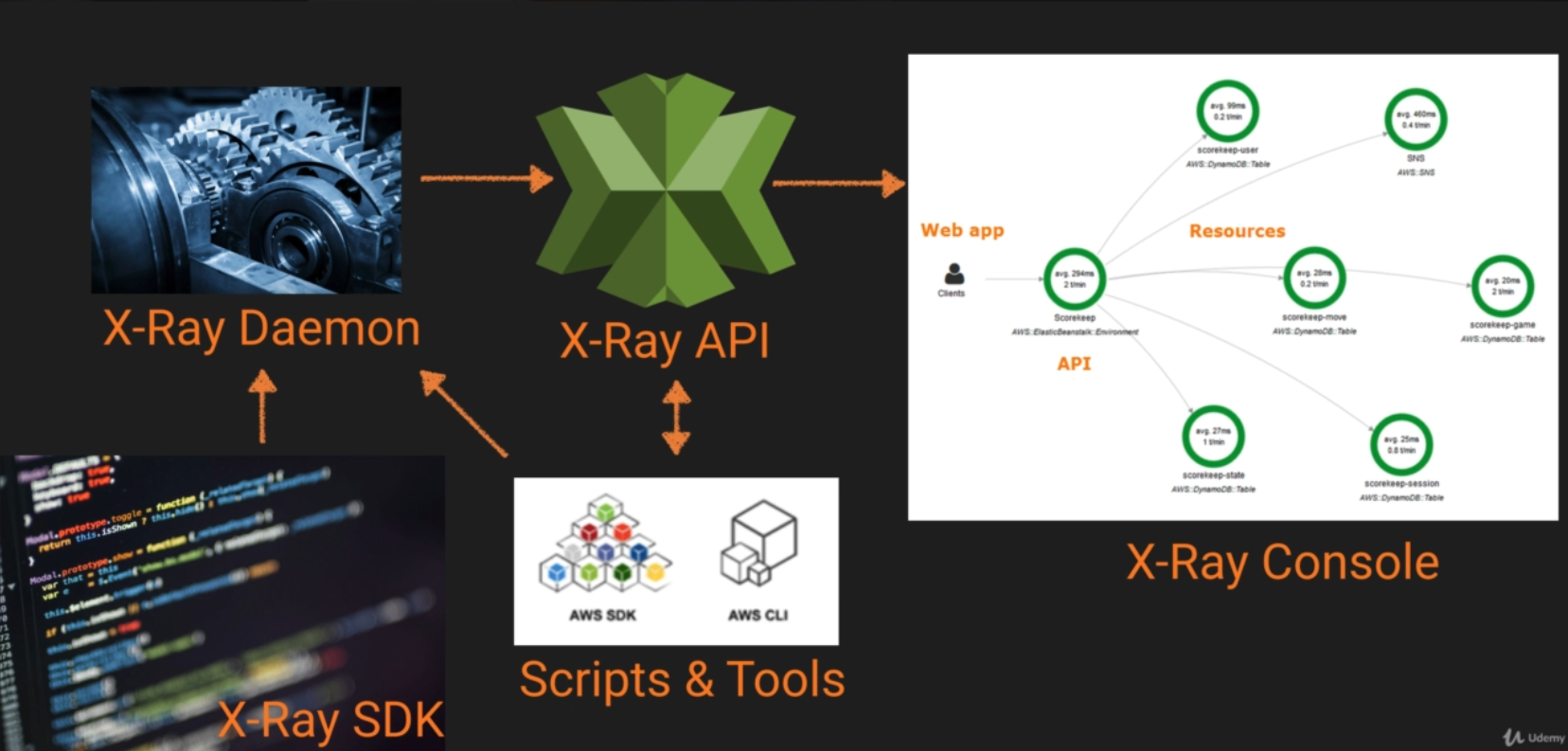

X-Ray SDK
AWS X-Ray allows you to debug what is happening. It provides :
- interceptors to add to your code to trace incoming HTTP requests
- Clients handlers to instrument AWS SDK clients that your application uses to call other AWS services
- An HTTP client to use to instruments calls to other internal and external HTTP web services
X-Ray integration
X-Ray integrates with the following langages :
- Elastic Load Balancing
- AWS Lambda
- AWS API Gateway
- AWS Elastic Compute Cloud
- AWS Elastic Beanstalk
X-Ray langage
The X-ray integrates with the following languages :
- Java
- Go
- Node.js
- Python
- Ruby
- .Net
9. Advanced API Gateway
import APIs
API Gateway Import API feature to import api from an external definition file into API Gateway. It suports Swagger v2.0 definition files.
With Import API, you can :
-
create a new API
- by submitting a POST request that includes a Swagger definition in the payload and endpoint configuration
-
update an existing API
- by using a PUT request that includes a Swagger definition
- with overwritting
- or mergind
- Import an edge-optimized API
- Import a regional API
- Import an OpenAPI file to update an existing API definition
- Set the OpenAPI basePath property
API Throttling
To prevent your API from being overwhelmed by too many requests (> 10_000 requests per seconds = RPS), Amazon API Gateway throttles requests to your API using the token bucket algorithm, where a token counts for a request. Specifically, API Gateway sets a limit on a steady-state rate and a burst of request submissions against all APIs in your account. In the token bucket algorithm, the burst is the maximum bucket size.
The maximum concurrent request is 5_000 requests across all APIs within an AWS account.
When request submissions exceed the steady-state request rate and burst limits, API Gateway fails the limit-exceeding requests and returns 429 Too Many Requests error responses to the client. Upon catching such exceptions, the client can resubmit the failed requests in a way that is rate limiting, while complying with the API Gateway throttling limits.
As an API developer, you can set the limits for individual API stages or methods to improve overall performance across all APIs in your account. Alternatively, you can enable usage plans to restrict client request submissions to within specified request rates and quotas. This restricts the overall request submissions so that they don't go significantly past the account-level throttling limits.
SOAP web service passthrough
You can configure API Gateway as a SOAP web service passthrough.