



1. Web Identity Federation
definition
Web Identity Federation let you give your user access to AWS resouce after successfull authentification (like Gogle Facebook or Amazon). they receive an authentifiaction code fro mthe web ID provider, which they can trade for temporary AWS security credentials.
amazon cognito
provides Web Identity Federation with folowing features :
- Sign-up and sign-in to your apps
- Access for guest users
- Acts as an Identiy Brokers between your app and web id providers (you do not need to write your own code to do this)
- synchronize user data for multiple devices
- recommended for all mobile applications AWS services
It is the recommended approach for web identity federation using social media accounts like facebook
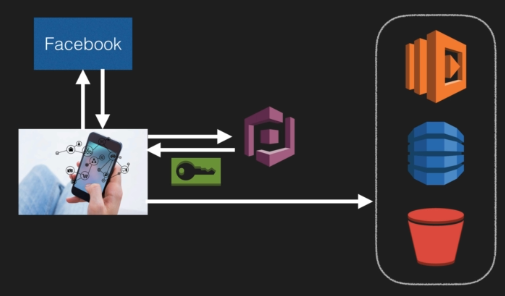
Cognito can log you to different applciations
2. Cognito User Pools
definitions - User Pools
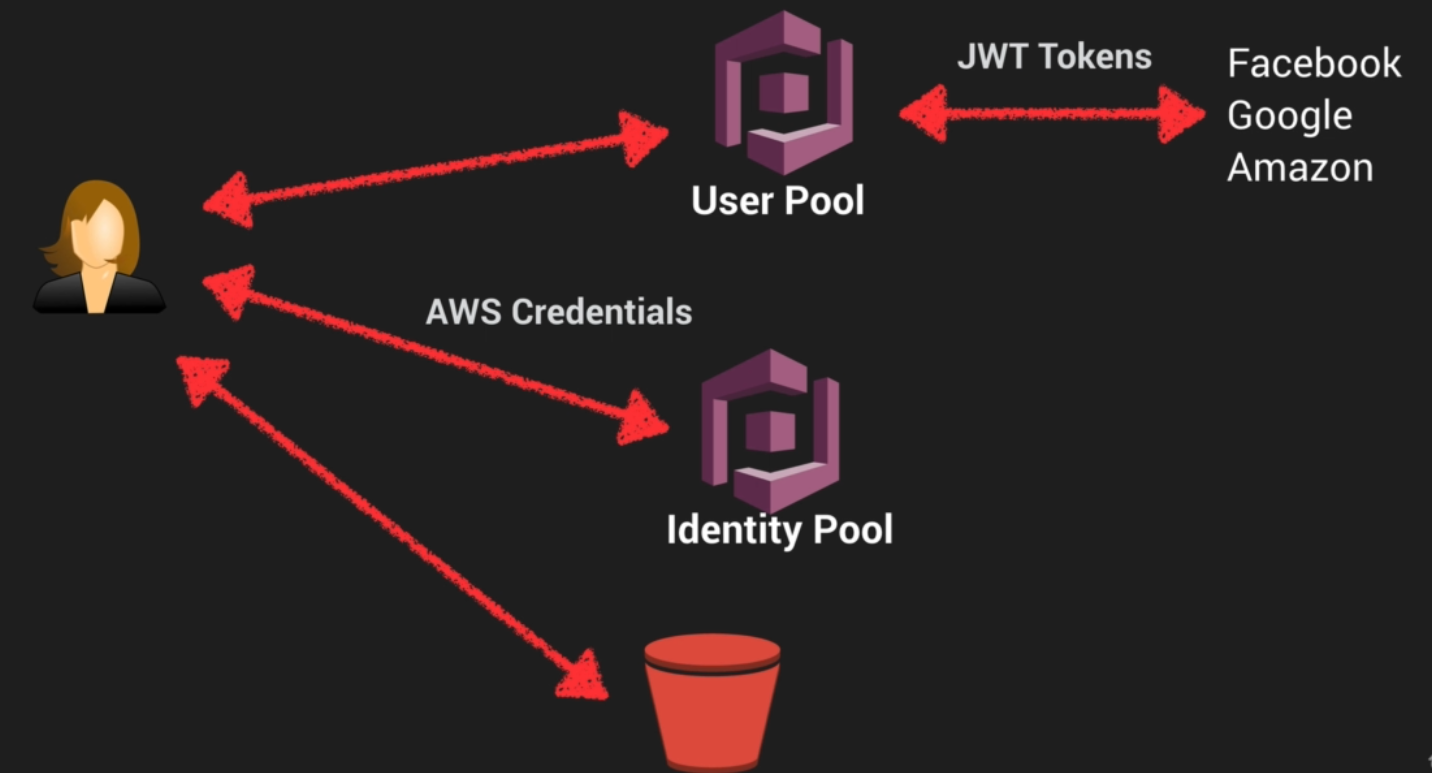
They are users directories used to manage sign-up and sign-in for mobile and web applications
Users can sign-in directly to the user pool, or indirectly provider (Facebook, Amazon, Google). Acts as an Identiy Brokers between your AWS app and web id providers. If successful authetification it generates a JSON web tokens (JWT)
definitions - Identity Pools
Identity Pools enable to create unique identifies for your users and authentificate them with identity providers
example
push synchronisation
Cognito tracks the association between user identity and various devices.
Cognito uses Push Synchronization to send a silent push notification of user data updates to multiples devie types associated with a user ID.
3. Cognito Lab
you can create group of users
steps
- Create an user Pools
- Add an app client
- Enable Identify providers
- Defines sign in and out URL : Callabck URL (redirection of the user after successfull authentification)
- OAuth 2.0 (JWT tokens) : Open Standard Authentification Framework
- Attach an Amazon Cognito Domain Name
- Customize Cognito (optional)
`login?responsetype=token&clientid=1343243&redirect_url=https://example.com
4. Inline Policies vs Managed Policies vs Custom Policies
IAM : Identity Access Managements, is used to define user access permissions within AWS
There are 3 differents types of IAM policies available :
-
Managed Policies : AWS-managed default policiies
- for common use ceses based on job function
- you can not change the permissions defined in the AWS management Policies
-
Customer Managed Policies : Managed by you
- is a standalone policy that create and administer inside you own AWS account
- you can attach this policy to multiple user, but only within your users
-
Inline Policies : Managed by you and ambedded in a single user, group, or role.
- it is an IAM policy which is actually embedded in a single user = strict relationship between the entity and the policy
In most cases AWS recommends using Manages Policies over Inline Policies
5. STS AssumeRoleWithWebIdentity API
AssumeRoleWithWebIdentity is an API provided by STS (Security Token Service)
Retuns temp security credentials for users Allow to authentificate users from a web identity provider to access AWS resource One the user has authentificated, the application makes the assume-role-with-web-identity
If you are on a mobile -> use Cognito, If not you can use AssumeRoleWithWebIdentity
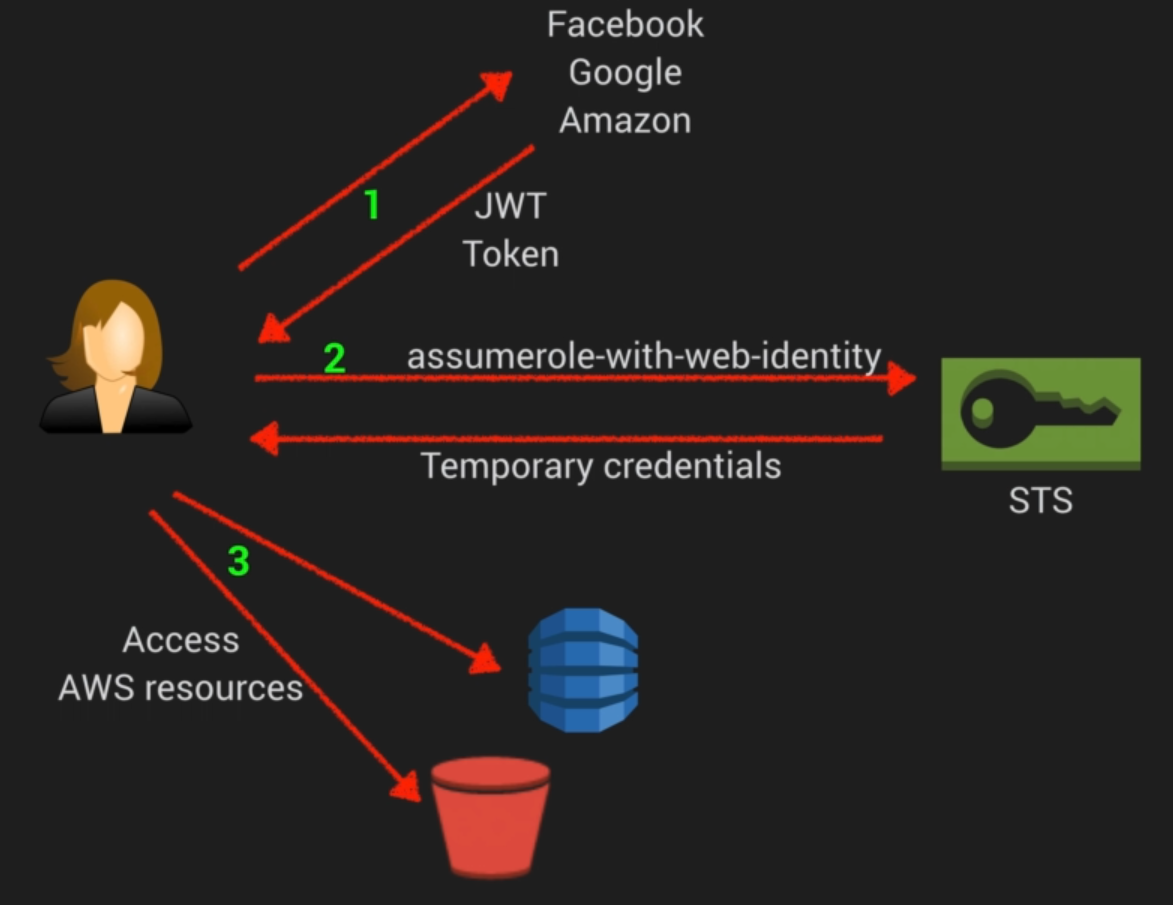
AssumeRoleUser with ARN (ARN identifiers which can be used refer to the temp credential) + Credentials (temporaty)