



TP8 - DynamoDB
1. Introduction to DynamoDB
Definition
DynamoDB = fast flexible NoSQL database service
Services with :
- consistent
-
single-digit milisecond latency at any scale
- stored in SSD Storage
Supports 2 data models:
- document
- key-value
It is serverless, integrate with lambda It avoids single point of failure (spread accross 3 distinct data centers)
2 read consistency models :
- Eventual (defaults) : best read performance, actualisation within a second
- Strongly
Tables
- item = column
- attributes = row
Documents can be writtent in JSON, HTML or XML
- key value = userID
- value = 123543
Primary keys
DynamoDB stores and retieves data based on a primary key
2 types of primary keys :
-
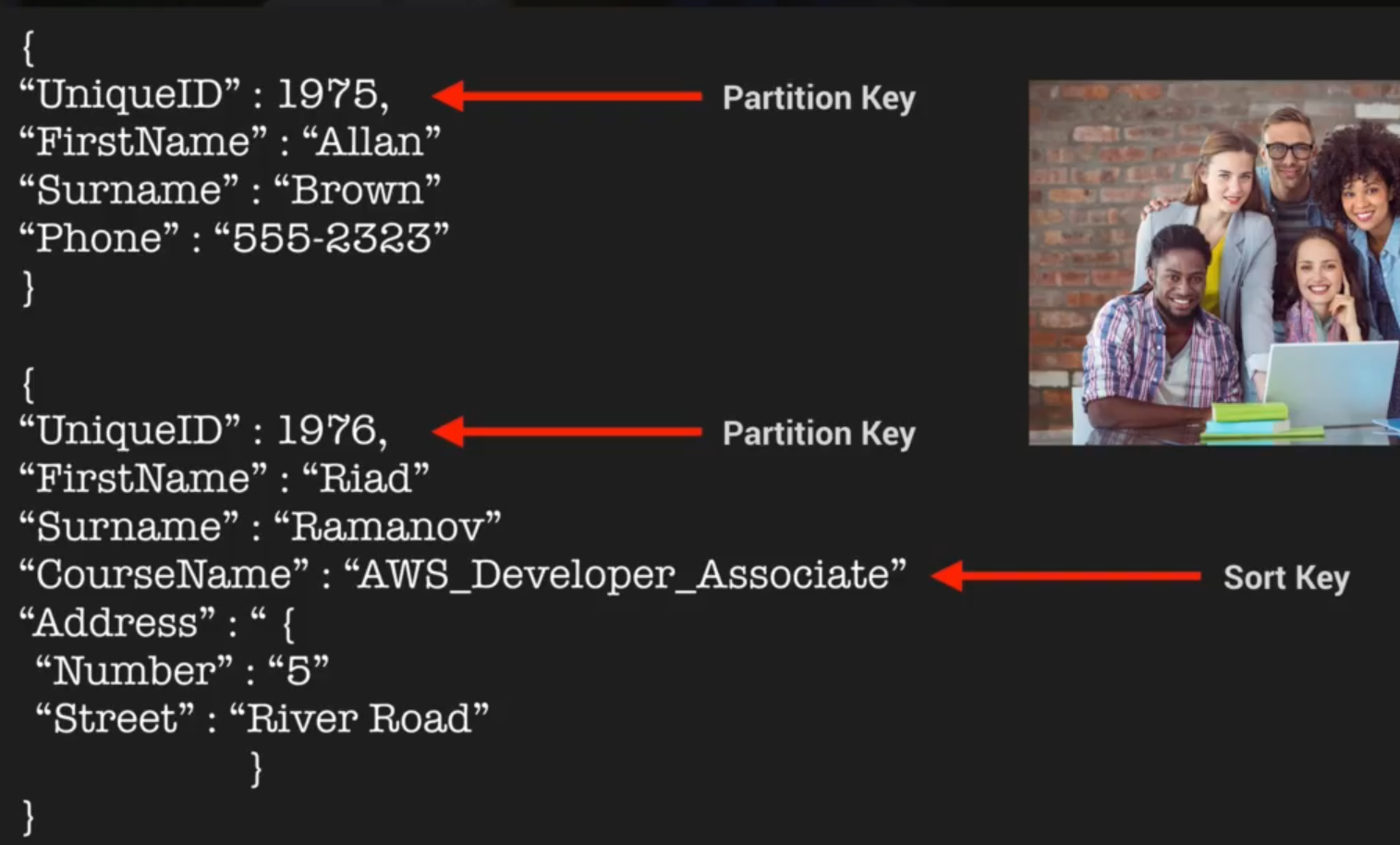
partition keys = unique attributes
- output of the hash funciton detemrine the location of the stored data
- no itmes can have the same partition keys
-
composite key = partition keys (userID) + sort key (timestamp of the post)
- allow you to store multiple items with the same Partition keys
Access control
- authentification and Access Control is managed using AWS IAM
- you can create an IAM user within your AWS account which has specific permission sto access and create DynamoDB tables
- you can create an IAM role which enabes you o obtaine teporary access keys which can be used to access DynamoDB
- you can use a special IAM Condition to restrict user access to only their own records
You can add a condition to an IAM Policy to allow access only to items where the partition key value matches their UserID
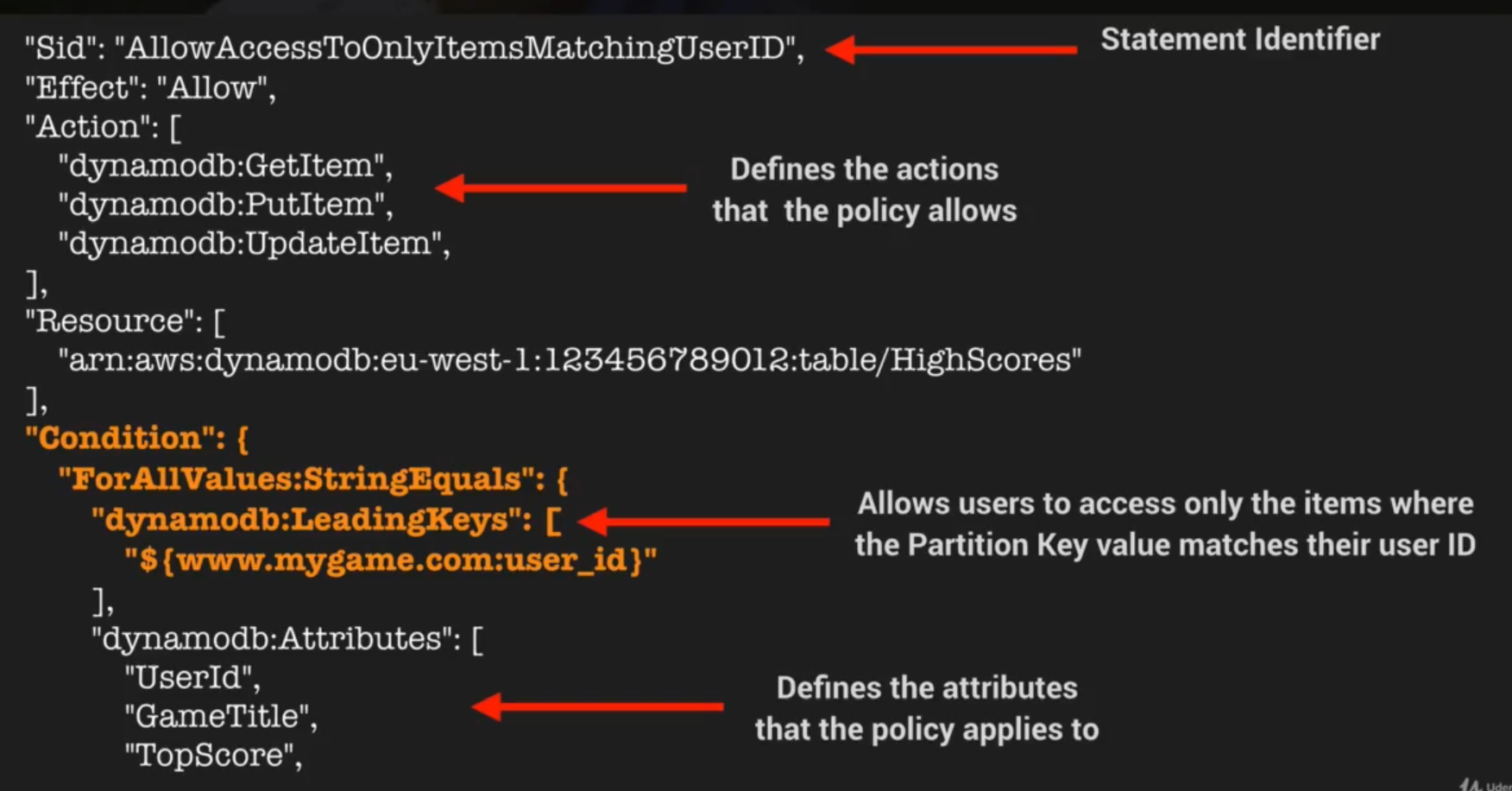
Partiton key = Leading Key
remember
- DynamoDB = low latency NoSQL database
- Consist of tables Items and Attributes
- Support document and key value data model
- support format are JSON XML HTML
- 2 types of primary key - Partition Key and combination of
- 2 consistency models : Strongly and Eventually
-
Access is controlled using IAM policies
- Fine grainded access control using IAM condition parameter : dynamodb:LeadingKeys to allow access only the items where the partiton key value matches their user ID
2. Creating a DynamoDB Table Lab
Steps
- Create IAM Service Role for EC2 for DynamoDB Full Access
- Create EC2 (by configuring instance initializing a php website)
- Connect to EC2 by ssh
- Install [AWS SDK for PHP version 2] (https://docs.aws.amazon.com/aws-sdk-php/v2/guide/installation.html) by downloading the composer
- Change the region of uploaddate.php
- Create the DynamoDB with IPaddress/dynamoDB/createTables.php
how to interact with the database using the command line ?
-
we will use the IAM service role to interact with DB and make queries
- aws dynamodb get-item --table-name XXX --region XXX --key XX
- using the
--key '{"Id" : {"N" : "205"}}'
3. Indexes Deepdive
index definition
- In SQL database : an index is a data structure which allows to perform fast queris on specific columns in a table (column selection)
-
In DynamoDB : 2 types of index
-
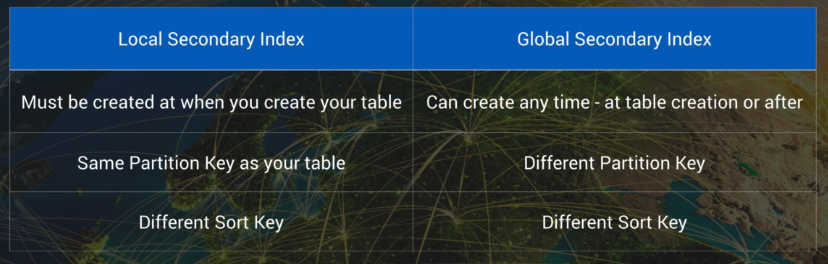
Local Secondary index
- can only be created at the table creation but not after
- same partition key than the original table but a different sort key -> different view
- increase the time queries based on this sort key
-
Gloabal Secondary Index
- can be created at and after table creation
- different partition and sort key
- increase the time queries of all data
-
4. Scan vs Query API Call
A query and a scan return all the attibutes of the items but you can use projection expression to select a specific attributes.
Query
A query finds items in a table based on the primary key attributes and a distinct value to search for.
- Result are always sorted by the sort key (numeric order, then ASCII character)
- Reverse the ascending order is possile with ScanIndexForwardparameter=F
By default queries are eventually consistent
Scan
A scan operation examines every item in the table By default returns all the attributes
Comparison
| Query | Scan | |
|---|---|---|
| Efficiency | + | - |
| Dump the entire table ? | no | yes |
| Can use up the provisioned throughput ? | no | yes |
improve performance
- setting smaller page size
- larger number of small operation
- avoid using scan operation
of scan
share your datable into segments and scan them in parallel
5. DynamoDB Provisioned Throughput
DynamoDB Provisioned Throughput is measured in Capacity Units
When you create a tabl, you specify your requirements in terms of Read Capacity Units and Write Capacity Units.
- 1 x Write capacity Unit = 1 x 1Kb write per second
-
1 x Read capacity Unit
- = 1 x 4Kb Strongly consistent read
- = 2 x 4Kb Eventually consistent read
steps to know how many do we need
- calculate how many Read CU needed for each read : Size of each item / 4 Kb
- Rounded-up
- Multiply by the number of read per second
6. DynamoDB On Demand Capacity
-
Charges aply for :
- reading
- writting
- storing
- on demand, you do not need to specify your requirements
- DynamoDB instantly scales up and down based on the activity of you applications
- great for unpredictable workloads
- you want to pay for only what you use
pricing model shoul I use ?
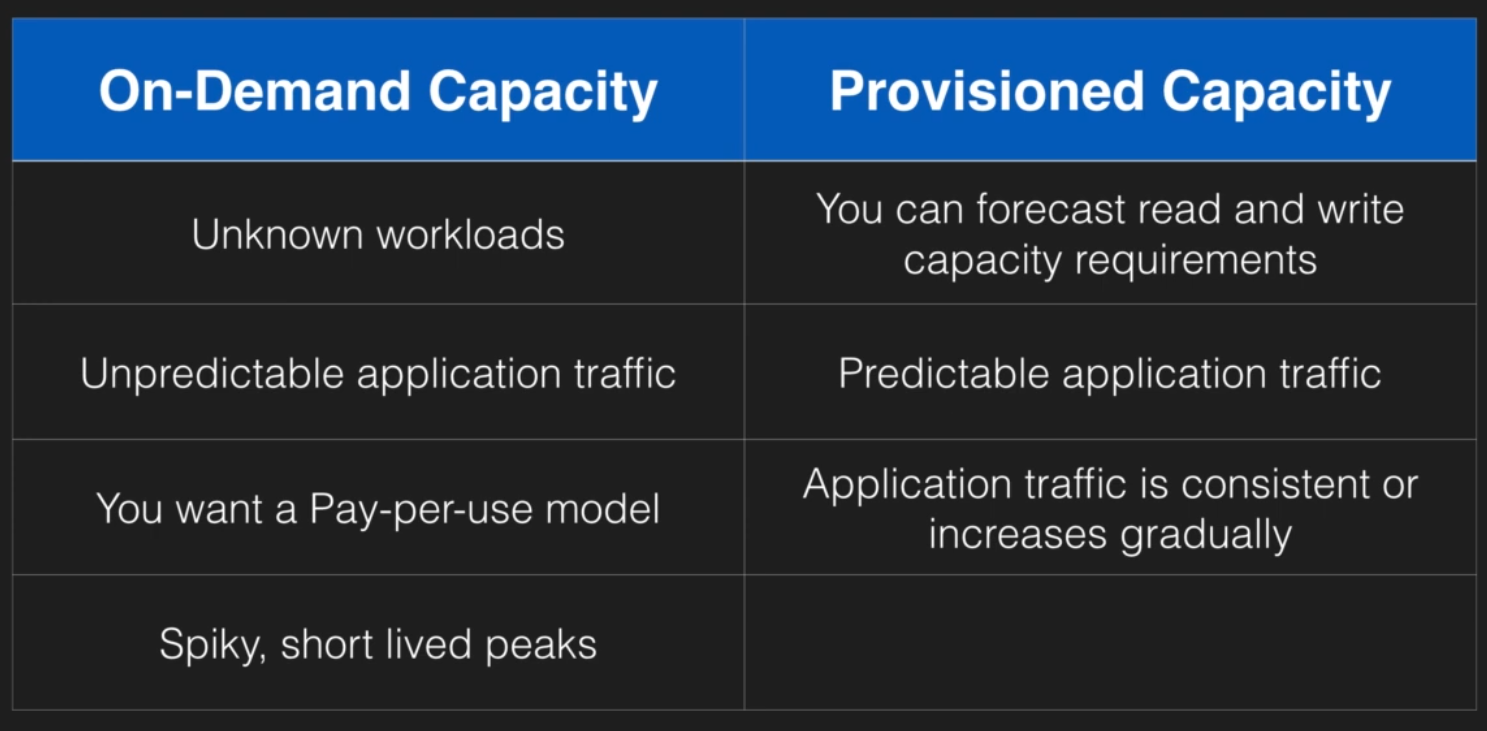
you can change of pricing model once a day.
7. DynamoDB Accelerator (DAX)
definition
*DAX = is a fully managed clustered in-memory cached for DynamoDB
Delivers up to a 10x read performance improvments = microsecond performance for millions of request per sec (Christmass or Black Friday) -> Ideal for Read-Heavy and bursty workloads
how it works
If the item is not available (cache miss) then DAX performs an Eventually Consistent GetItem operation against DynamoDB
NOT suitable for
- NOT suitable for application requiring strongly consistent reads
- write intensive application
- few read operations
- application that do not need microseconds response times
9. DynamoDB Transactions
ACID transactions : Atomic (single unit, all or nothing operations) Consistent (must let datatable in a valid state) Isolated (not dependency in transaction) Durable (when a transaction have been commited it will remain in the data table)
Read or write multiple items across multiple tables as an all or nothing operations.
10. DynamoDB TTL
definition
TTL : Time To Live defines an expiry time for your data
It is relevant to remove old data (session data event logs ...) and so reduce cost storage data
It is expressed as POSIX (Unix Time = ) EpochConverter L'heure Unix ou heure Posix (aussi appelée Unix timestamp) est une mesure du temps basée sur le nombre de secondes écoulées depuis le 1er janvier 1970 00:00:00 UTC, hors secondes intercalaires. Les quatre premières lettres forment l’acronyme de Portable Operating System Interface (interface portable de système d'exploitation), et le X exprime l'héritage UNIX.
select items on TTL
steps :
- check your IAM user permissions (aws iam get-user)
- create a sessionData table (aws dynamodb create-table)
- populate sessionData table (aws dynamodb batch-write-item)
11. DynamoDB Streams
definition
It s a time ordered sequece (or streams). So any modification at the item level (insert update, delete) will be saved in the DDB streams with a encrypted log during 24h. They are used to trigger event or lambda event based on a change of the DDB table By default the primary key is recorded. Before and After images can be captured.
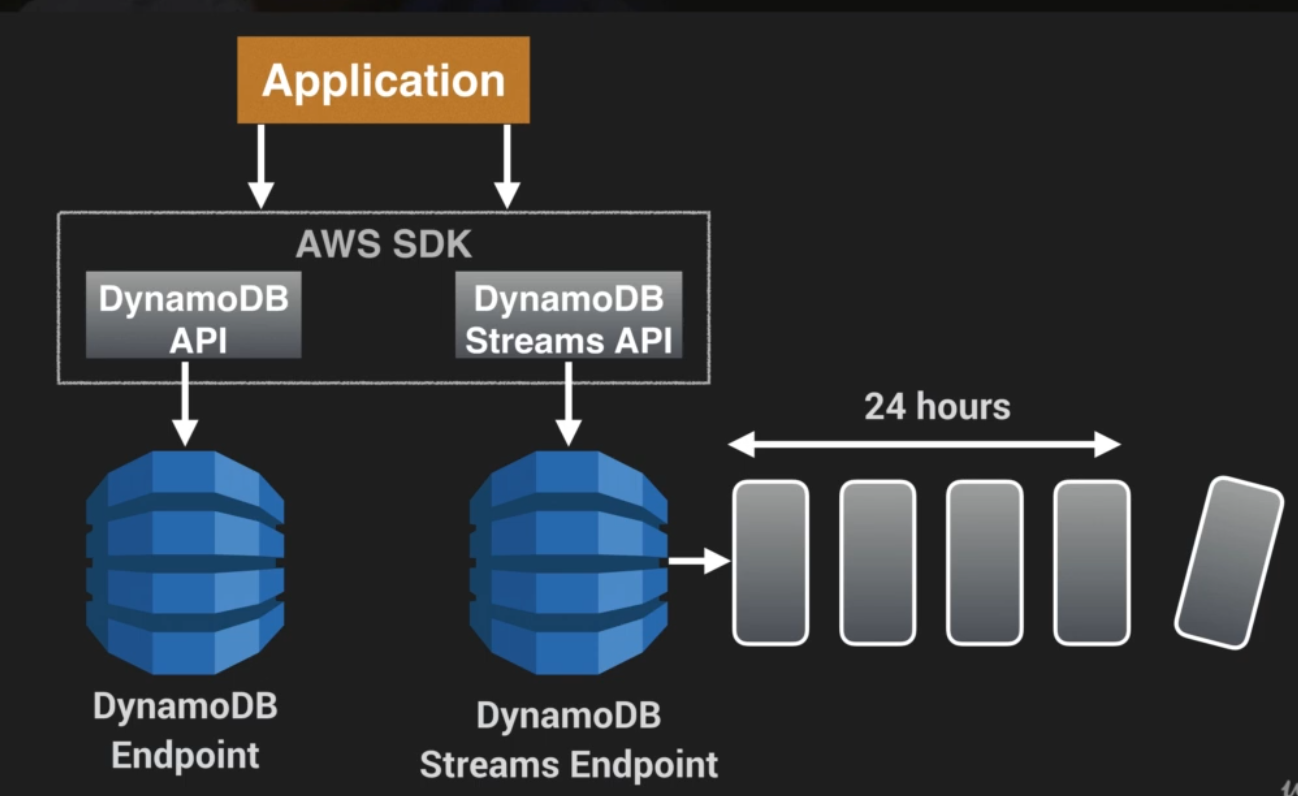
The DDB endpoint is different than DDB streams endpoint
12. Provisioned Throughput Exceeded & Exponential Backoff
If you see Provisioned Throughput Exceeded error it means the number of request is too high
Provisioned Throughput Exceeded exception
If you request rate is too high for the read / write capacity provisionned on you DDB table. SDK will automatically retries requests untill successful
exponential backoff
If we do not use SDK, we can :
- reduce the request frequency
- use the exponential backoff
Exponential backoffs improves flow by retrying request using progressively longer waits (10 20 40 80 ms...) If the waiting exceed 1min, your request may exced the throughtput of your red/Write capacity.